




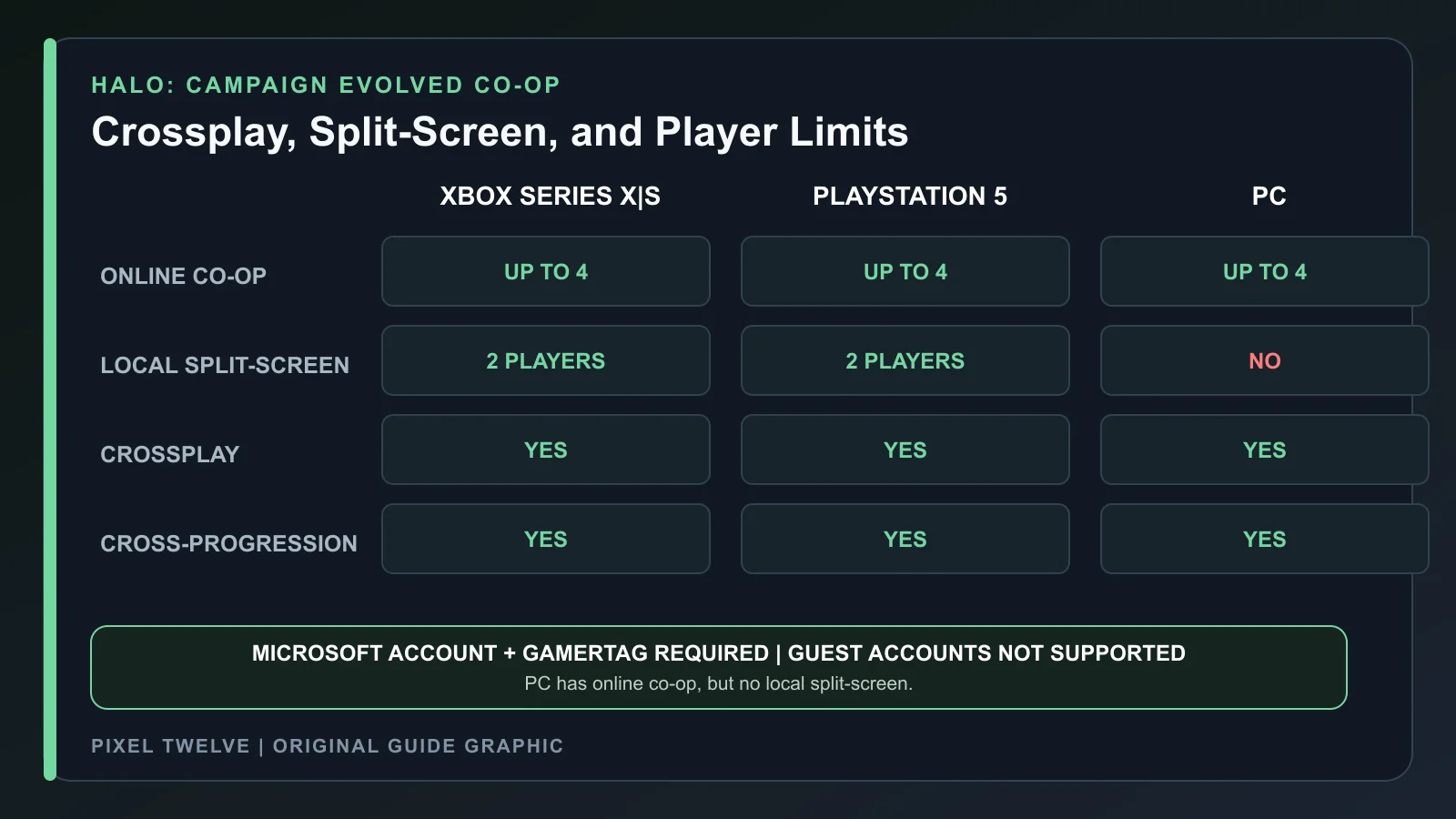
Halo: Campaign Evolved supports up to four players in online campaign co-op across Xbox Series X|S, PlayStation 5, and PC. Xbox and PS5 also support two-player local split-screen. PC does not have split-screen.
Crossplay and cross-progression use a linked Microsoft account and Xbox Gamertag. Guest accounts are not supported, so every local player must sign in with a console profile, and PlayStation players must link that profile to a Microsoft account.
All 13 campaign missions support co-op. Use the complete Halo mission list to choose the main story or one of the three Operation: METEORITE missions.
Halo: Campaign Evolved Co-op at a Glance
- Online campaign: up to 4 players across Xbox Series X|S, PS5, and PC.
- Local split-screen: 2 players on Xbox Series X|S and PS5.
- Local split-screen: not supported on PC.
- Crossplay: supported across all three platform families.
- Cross-progression: supported through a linked Microsoft account.
- Guest accounts: not supported for split-screen.
How Many Players Can Play Halo: Campaign Evolved?
Online Co-op Supports Up to Four Players
A Fireteam can include up to four online players. The group can mix Xbox Series X|S, PlayStation 5, Steam, Microsoft Store, and Xbox App PC players when crossplay is enabled.
Console Split-Screen Supports Two Players
One Xbox Series X|S or PS5 can host two local players on the same screen. That pair can remain offline or connect with other systems to build a three- or four-player network Fireteam.
PC Does Not Support Split-Screen
Steam and Windows PC players need separate devices and accounts for co-op. Connecting a second controller to one PC does not add a local player.
There Is No Competitive Multiplayer
Campaign Evolved is built around the campaign. The multiplayer features are cooperative; it does not include a separate competitive arena or matchmaking suite.

How to Start Split-Screen Co-op on Xbox or PS5
- 1. Connect the second controller before opening the co-op menu.
- 2. Sign Player 1 into the console and open Halo: Campaign Evolved.
- 3. At the main menu, have Player 2 press A on Xbox or Cross on PlayStation.
- 4. Choose a real console profile for Player 2. Guest profiles do not work.
- 5. On PS5, make sure Player 2 has already linked the PlayStation Network profile to a Microsoft account.
- 6. After Player 2 joins the Fireteam, select the campaign mission and difficulty.
The second player can change controls and accessibility options from a limited settings menu. Some options, including graphics mode, remain controlled by the primary player.
Do You Need Xbox Game Pass or PlayStation Plus for Split-Screen?
No subscription is required for two-player local split-screen when the session stays on one console. The game can also be played offline after any required first-time account linking is complete.
A network Fireteam may require Xbox Game Pass or PlayStation Plus when the local pair connects to players on other consoles or PCs. The exact requirement can depend on the signed-in account, home-console sharing, and the platform running the session.
How to Set Up Crossplay
Link a Microsoft Account
Halo: Campaign Evolved uses the Microsoft account as the common identity across platforms. PlayStation 5 and Steam players are prompted to link their platform account the first time they play. Xbox and Microsoft Store players use the Microsoft account already connected to their Xbox profile.
Add the Other Player by Xbox Gamertag
Cross-platform friends must be friends through the Xbox network. Search the exact Gamertag in the Xbox mobile app, Xbox Game Bar, or Xbox.com. A PlayStation username or Steam display name will not find the account in the cross-platform list.
Use the Cross-Platform Friends Tab
Open Play Co-Op from the main menu, switch to Cross-Platform Friends, and invite the player. On PlayStation and Steam, the invited player should remain at the main menu so the in-game notification can appear.
Keep Crossplay Enabled
Open Settings, choose Account, and confirm that Cross-play is on. Platform or account privacy controls must also allow multiplayer, cross-platform play, and online communication.
Platform Friends vs. Cross-Platform Friends
Platform Friends are connected by the native network: Xbox network on Xbox, PlayStation Network on PS5, Steam friends on Steam, and Xbox network for Microsoft Store or Xbox App PC. These invitations use the platform's normal overlay or notification system.
Cross-Platform Friends are connected by Xbox Gamertags. They appear in a separate in-game tab and use Halo's own invitation flow. The linked Xbox account must appear online or invitations can fail even when the native platform account looks available.
How Co-op Progression Works
Mission Unlocks Are Shared
Completing a mission or reaching a rally point can permanently grant that unlock to every Fireteam member. The system does not automatically fill earlier gaps: completing mission five can unlock mission five without granting missions one through four.
Skulls and Terminals Are Shared
When one player discovers a Skull or Terminal, Fireteam members who do not already own it receive the collectible. This makes co-op useful for group cleanup runs.
Plan the route with the all 39 Halo Skull locations and the 13 Terminal locations guide.
The Fireteam Leader Controls Available Content
The leader's campaign progress determines which missions, rally points, and Skulls the group can select. A leader who finished the campaign can open later missions for newer players. A leader early in the story can temporarily limit choices for players who have more progress.
What Cross-Progression Saves
- Missions and rally-point unlocks.
- Skulls.
- Terminals.
- Achievements and trophies.
These records follow the linked Microsoft account across supported platforms. A player can finish a mission on Xbox and see the larger campaign unlock on PS5 or PC after signing into the same account.
What Cross-Progression Does Not Save
- Mid-mission checkpoints from the middle of a level.
- Exact player position inside the current mission.
Move to another platform after reaching a mission completion or useful rally point. Closing the game halfway through a fight and reopening it elsewhere will not continue from the same small checkpoint.
Best Player to Host the Fireteam
Choose the person with the fastest, most stable connection and the mission progress the group needs. Co-op networking quality depends heavily on the Fireteam Leader, and the session ends for everyone if that leader leaves or disconnects.
If the group wants a late mission, let the player with the most complete campaign lead. If the group wants a fresh story run, a new player's progress can keep the mission order simple.
Can You Play Halo: Campaign Evolved Co-op Offline?
Yes, solo and two-player console split-screen can work offline. Steam and PlayStation require an internet connection for the initial Microsoft account link. After that first link, the supported offline platform settings must still be enabled.
Online co-op, crossplay, and cross-progression obviously need a connection. A local split-screen pair can stay offline, but its progress will not sync to another platform until the account goes online again.
Best Co-op Setup Before the First Mission
Choose the Difficulty Together
A new player and a Halo veteran may want different levels of pressure. Normal gives the group time to explore and learn the sandbox. Heroic works better when everyone already understands shield recovery, weapon roles, grenades, and vehicle controls.
Let the Most Stable Connection Host
The Fireteam Leader affects the whole session. Use the player with the strongest and most consistent connection, not simply the person who sent the first invitation. This lowers the chance that one disconnect returns everyone to the main menu.
Match the Host to the Mission Goal
For a fresh story run, let the least advanced player lead so the mission list stays in order. For collectible cleanup or a late mission, use the player with the most complete campaign and rally-point access.
Set Controls and Accessibility Before Launching
Each player should adjust sensitivity, button layout, subtitles, and accessibility settings at the main menu. Split-screen Player 2 can change a limited group of settings, but some display options remain controlled by Player 1.
Agree on Collectible Detours
One player finding a Skull or Terminal can grant it to Fireteam members who still need it. Tell the group before leaving the main route so nobody starts the next encounter while the collector is searching another room.
How Split-Screen Changes the Session
Two local players share one display and one console. Player 2 joins the Fireteam with a real profile and can adjust controls and accessibility, but cannot change every graphics option or edit all customization from the secondary position.
If the local pair later joins an online Fireteam, the session can grow to three or four people. At that point, online subscription and account-sharing rules may apply even though the two players began together on one console.
Why Can I Not Join My Friend?
The Friend Request Was Not Accepted
Xbox friendship may require both people to add each other. Close and reopen the friends menu after acceptance, or restart the game if the name still does not appear.
The Linked Xbox Account Is Offline
Steam and PlayStation players should set the linked Xbox profile to appear online. Native platform visibility alone may not be enough for an in-game cross-platform invitation.
The Player Is Not at the Main Menu
PlayStation and Steam players must be at the main menu to receive certain in-game invites. Finish or leave the current activity, then send the invitation again.
Crossplay or Privacy Is Disabled
Check the Cross-play toggle in Halo and the multiplayer permissions on the Microsoft, Xbox, or PlayStation account. Child and family accounts can have restrictions that block communication or cross-network play.
The Lobby Is Full or Invite Only
A four-player Fireteam cannot accept another member. The leader can also set the lobby to Invite Only, which blocks direct joining until an invitation is sent.
Game Bar Is Not Showing PC Invites
Open Xbox Game Bar with Windows + G before the invitation is sent. Keeping the Xbox Social widget visible can help the notification appear.
Halo Co-op FAQ
Is Halo: Campaign Evolved Crossplay?
Yes. Online campaign co-op supports crossplay between Xbox Series X|S, PS5, and PC.
Does Halo: Campaign Evolved Have Split-Screen?
Yes on Xbox Series X|S and PS5 for two local players. PC split-screen is not supported.
Can Four Players Use One Console?
No. One console supports two local players. A four-player group needs online connections to other consoles or PCs.
Do Both Split-Screen Players Need Accounts?
Yes. Guest accounts are not supported. Both players need signed-in console profiles, and PS5 players need linked Microsoft accounts.
Can Xbox and PlayStation Players Join Each Other?
Yes. Add each other by Xbox Gamertag, use the Cross-Platform Friends list, and keep crossplay enabled.
Does Co-op Include Operation: METEORITE?
Yes. All 13 campaign missions, including the three METEORITE missions, support co-op.
Do Collectibles Count for Everyone?
Skulls and Terminals found during a shared session are granted to Fireteam members who do not already have them.
Where Can I Find More Halo Guides?
Open the Halo: Campaign Evolved game page for the latest co-op, mission, and collectible coverage.