Pokémon Bank ends service on Thursday, February 25, 2027, at 7:00 p.m. PST in North America. That is 3:00 a.m. UTC and noon in Japan on Friday, February 26. When the service closes, transfers from Pokémon Bank to Pokémon HOME end too.
The Nintendo support notice also says Pokémon Bank is not currently available as a new download. If the app, Poké Transporter, or your account access needs attention, fix it well before the final day.
Pokémon Bank shutdown quick facts
- North America: February 25, 2027, at 7:00 p.m. PST.
- Global time: February 26, 2027, at 3:00 a.m. UTC.
- What ends: Pokémon Bank service and the Bank-to-HOME transfer connection.
- What you need: A paid Pokémon HOME Premium Plan. Nintendo Switch Online is not required.
- Transfer direction: One way. Pokémon moved into HOME cannot return to Bank.
- New downloads: Pokémon Bank is not available to add as a new app.
Pokémon Bank shutdown checklist
- 1. Open Bank now. Start the Nintendo 3DS, install any system or app update it requests, and confirm that Bank reaches your online Boxes.
- 2. Check Poké Transporter. If Pokémon are still in an older compatible game that uses Poké Transporter, confirm that app is already available and working on the same system.
- 3. Verify both accounts. Confirm the Nintendo Network ID used by Bank and the Nintendo Account used by HOME. Link them before using the no-3DS transfer option.
- 4. Make a priority list. Start with event Pokémon, shinies, ribbon collections, old story teams, competitive builds, and anything with personal value.
- 5. Confirm HOME Premium. The paid HOME Premium Plan must be active for a Bank transfer. A Nintendo Switch Online membership does not replace it.
- 6. Run a test transfer. Move one small box, confirm it arrived in the correct HOME account, and check which destination games can receive those Pokémon.
- 7. Finish in batches. Move the important boxes first, verify each group in HOME, and do not leave the rest for the shutdown day.
What should you transfer first?
Start with Pokémon that cannot be replaced easily. A practical order is:
- Already in Bank: Anything valuable that is currently stored in an online Bank Box.
- Event and one-off Pokémon: Limited distributions, old gifts, version-specific encounters, and Pokémon tied to discontinued events.
- Long-term collections: Shinies, ribbons, old teams, Living Pokédex entries, competitive Pokémon, and Pokémon moved across several generations.
- Compatible older games: Pokémon still sitting in a supported 3DS title or another compatible title that reaches Bank through Poké Transporter.
You do not need to move every common duplicate. Protect the collection that matters first, verify it in HOME, and then decide whether the remaining boxes are worth the time and HOME storage.

What you need before starting
The official Pokémon HOME instructions require a paid HOME Premium Plan for transfers from Bank. They also confirm that Nintendo Switch Online is not required.
You need access to the Nintendo Account used by HOME. If you use the transfer option without a 3DS, that Nintendo Account must be linked to the Nintendo Network ID used by Bank. Check old passwords and email access before beginning.
Pokémon Bank is unavailable as a new download. Nintendo’s 3DS eShop Q&A says previously owned 3DS content can still be redownloaded for the foreseeable future, but that does not let a new account acquire Bank or Poké Transporter. Check your download history now if an app is missing.
What if your old Pokémon Bank pass expired?
An expired Bank pass does not automatically mean the stored Pokémon are gone. Pokémon Support says to start Bank, update the 3DS if prompted, choose No when asked about buying a new pass, and then select Use Pokémon Bank. You still need HOME Premium for the move into HOME.
How to move Pokémon from Bank to HOME with a 3DS
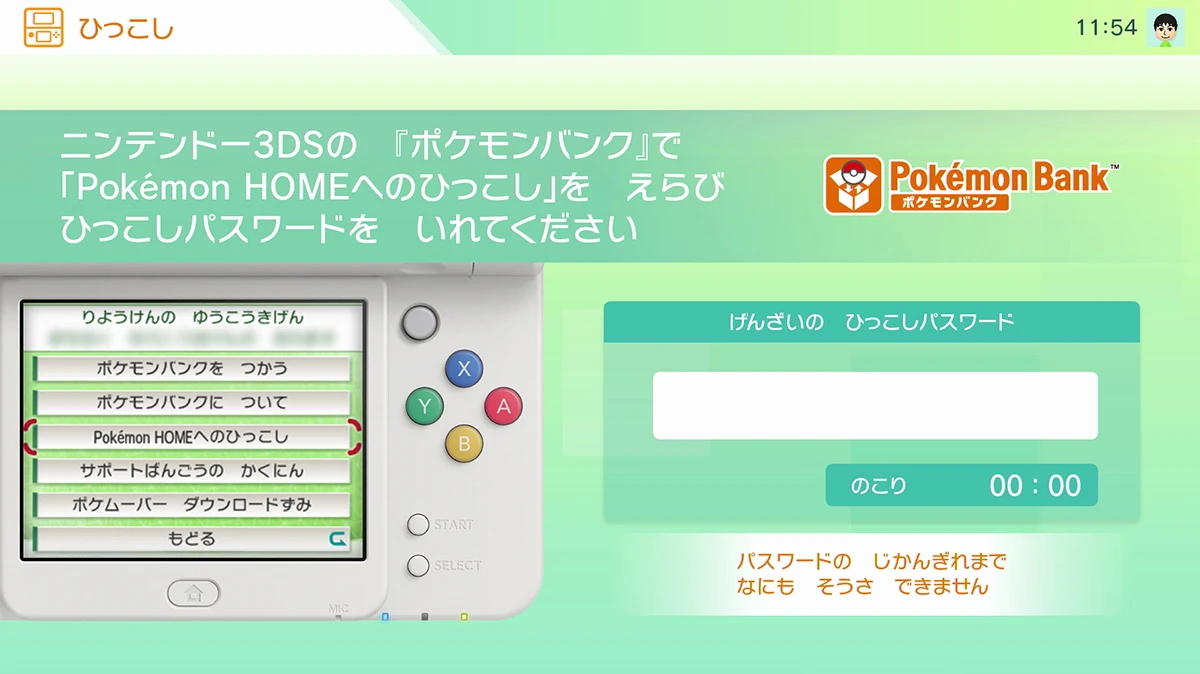
- 1. In Bank, choose Move Pokémon to Pokémon HOME from the main menu.
- 2. Select the Boxes, press the Y Button, and confirm the move.
- 3. In HOME, choose Move, then Begin Move, and confirm that you are ready.
- 4. Display the Moving Key. HOME creates a key that expires after three minutes.
- 5. Return to Bank, enter the Moving Key, and let the transfer begin.
Have both systems ready before generating the key. If it expires, request a new one instead of repeatedly entering the old code. Moving Keys do not include the letters O, I, or Z.
Can you transfer from Pokémon Bank without the 3DS?
Yes, but only when the Nintendo Network ID used with Bank is linked to the Nintendo Account used by HOME. In HOME, choose Move, select No Nintendo 3DS, verify the linked account, and begin.
This option moves every Pokémon stored in Bank at once. You cannot choose individual Boxes, so confirm the account carefully before accepting the transfer.
What happens after the Pokémon reach HOME?
The move is permanent. The Pokémon HOME transfer page states that Pokémon moved from Bank cannot return to Bank.
Reaching HOME does not mean every Pokémon can enter every Switch game. A Pokémon can move only into a game in which it appears. Check Games it can travel to on the Pokémon’s HOME details screen before planning its final destination.
Common Pokémon Bank transfer problems
- Bank or Transporter is missing: Bank cannot be acquired as a new download. If it was previously tied to the account, check the 3DS download history while redownloads remain available.
- Bank says the pass expired: Decline the purchase prompt and select Use Pokémon Bank, following the current Pokémon Support steps.
- Moving Key expired: Generate a new key in HOME. Each key lasts three minutes.
- Wrong account appears: Stop before confirming. Recheck the Nintendo Network ID and Nintendo Account link, especially for a transfer without the 3DS.
- A Pokémon cannot enter a game: Keep it in HOME and check its Games it can travel to list. Compatibility depends on whether that Pokémon appears in the destination game.
Pokémon Bank shutdown FAQ
- When is Pokémon Bank shutting down? February 25, 2027, at 7:00 p.m. PST in North America, which is February 26 at 3:00 a.m. UTC.
- Can you transfer after the shutdown? No. The official notices say the Bank-to-HOME connection ends with the service.
- Do you need Pokémon HOME Premium? Yes. A paid Premium Plan is required for a Bank transfer.
- Do you need Nintendo Switch Online? No. Pokémon Support says it is not required for this transfer.
- What should you transfer first? Move event Pokémon, shinies, ribbon collections, old teams, and anything personally important before common duplicates.
The safest approach is simple: open Bank now, prove the correct HOME account can receive one small box, and move the irreplaceable Pokémon months before the deadline.