
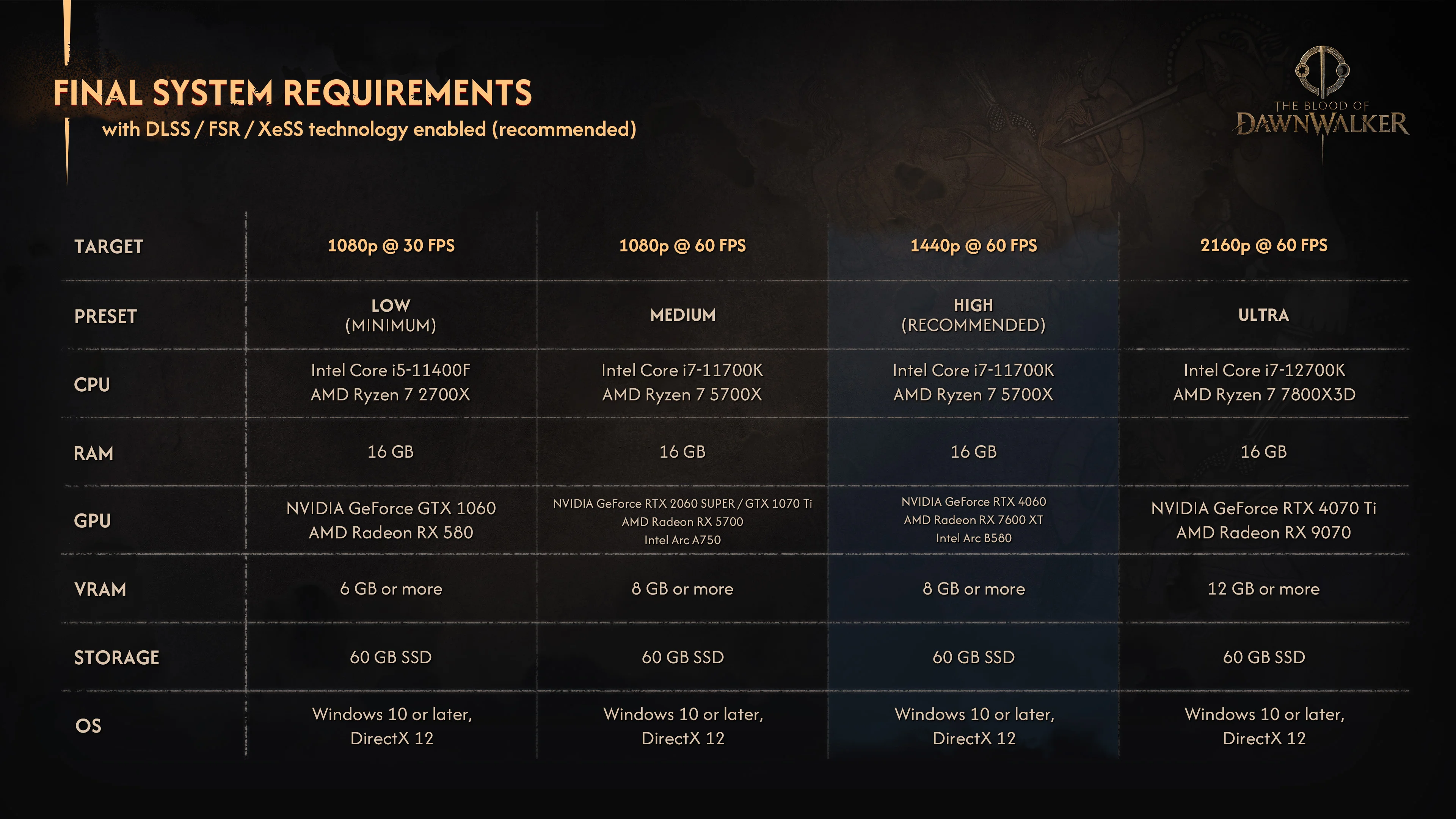
The Blood of Dawnwalker requires 16GB of RAM and a 60GB SSD at every official PC tier. The minimum target is 1080p at 30fps on Low with a GTX 1060 or RX 580, while the recommended High target is 1440p at 60fps with an RTX 4060, RX 7600 XT or Intel Arc B580. All four published targets use DLSS, FSR or XeSS set to Balanced, so they are not native-resolution performance claims.
The final chart also includes a 1080p/60 Medium tier and a 4K/60 Ultra tier. CPU demands rise only at Ultra, but graphics memory scales from at least 6GB on Low to 12GB on Ultra. These are target configurations from Rebel Wolves, not benchmark guarantees for every scene, driver version or custom setting combination.
Dawnwalker PC requirements at a glance
- Low — 1080p at 30fps: Core i5-11400F or Ryzen 7 2700X, GTX 1060 or RX 580, 16GB RAM and at least 6GB VRAM.
- Medium — 1080p at 60fps: Core i7-11700K or Ryzen 7 5700X, RTX 2060 Super, GTX 1070 Ti, RX 5700 or Intel Arc A750, plus 16GB RAM and at least 8GB VRAM.
- High — 1440p at 60fps: Core i7-11700K or Ryzen 7 5700X, RTX 4060, RX 7600 XT or Intel Arc B580, plus 16GB RAM and at least 8GB VRAM.
- Ultra — 2160p at 60fps: Core i7-12700K or Ryzen 7 7800X3D, RTX 4070 Ti or RX 9070, plus 16GB RAM and at least 12GB VRAM.
- Required at every tier: a 60GB SSD, Windows 10 or later, DirectX 12 and Balanced DLSS, FSR or XeSS for the listed target.
What Balanced upscaling means for these targets
The chart says DLSS, FSR or XeSS is enabled, and the official Dawnwalker account clarified that the preset is Balanced. In practical terms, the game renders internally below the displayed resolution and reconstructs the final 1080p, 1440p or 2160p image. A 1440p/60 High target therefore does not mean the listed GPU delivers 60fps at native 1440p.
Expect results to vary if you switch to Quality upscaling, disable reconstruction, raise individual settings above the named preset or use a different driver. The published chart does not say that frame generation is required, so it would be misleading to add that assumption. Treat the listed combinations as the studio’s starting points and tune from there.
Minimum requirements for 1080p at 30fps
The Low preset pairs a Core i5-11400F or Ryzen 7 2700X with a GeForce GTX 1060 or Radeon RX 580. Rebel Wolves specifies at least 6GB of graphics memory, 16GB of system memory and an SSD. The target is 1080p at 30fps with Balanced upscaling, not 60fps and not native 1080p.
That VRAM line matters when comparing older cards with several memory configurations. Matching a GPU family name alone is not enough if a particular card has less than the published 6GB floor. The same caution applies to a hard drive: the chart explicitly calls for an SSD rather than merely 60GB of free space on any drive.
What you need for 1080p at 60fps
For Medium at 1080p/60, the CPU step moves to a Core i7-11700K or Ryzen 7 5700X. The supported examples are an RTX 2060 Super, GTX 1070 Ti, RX 5700 or Intel Arc A750, with at least 8GB VRAM. RAM and storage stay at 16GB and 60GB on an SSD.
Medium is the relevant official target for players who prioritize 60fps on a 1080p display. It is also a better comparison point than the minimum tier when judging similarly aged hardware, because the minimum chart is explicitly built around 30fps.
Recommended requirements for 1440p at 60fps
The official High preset is the recommended configuration: Core i7-11700K or Ryzen 7 5700X, RTX 4060, RX 7600 XT or Intel Arc B580, at least 8GB VRAM, 16GB RAM and a 60GB SSD. Its target is 1440p at 60fps with Balanced upscaling enabled.
Medium and High share the same CPU pair, memory capacity and VRAM floor. The main published jump is the graphics card and display target. That makes the High row the most useful official baseline for a modern 1440p system, while still leaving room for per-setting adjustments once independent benchmarks are available.
Ultra requirements for 4K at 60fps
Ultra targets 2160p at 60fps with a Core i7-12700K or Ryzen 7 7800X3D and an RTX 4070 Ti or RX 9070. The minimum graphics-memory line rises to 12GB. System RAM remains 16GB, while the SSD requirement remains 60GB.
This is still a Balanced-upscaling target, not a native-4K promise. If native rendering, ray-tracing options or a locked frame rate matter to you, wait for measured launch-version benchmarks rather than reading extra guarantees into the hardware table.
RAM, VRAM, storage and Windows requirements
- System RAM: 16GB across Low, Medium, High and Ultra. The chart does not list a 32GB requirement for Ultra.
- Graphics memory: at least 6GB for Low, 8GB for Medium and High, and 12GB for Ultra.
- Storage: 60GB available on an SSD at every tier. An HDD is not the published target.
- Operating system and API: Windows 10 or later and DirectX 12 for all four configurations.
Is there an official Steam Deck target?
No official Steam Deck performance target or compatibility rating is published in the final requirement chart or the current Steam listing. The Low row alone does not prove handheld support, because Deck performance also depends on the game build, memory behavior, controls, shader compilation and platform-specific work.
For a reliable answer, wait for an official compatibility statement or testing on the retail build. Until then, labeling the game Verified, unsupported or playable at a particular frame rate would be speculation.
How to compare your PC with the chart
- Choose the target first: decide whether you want 1080p/30, 1080p/60, 1440p/60 or 4K/60 instead of comparing your parts with the wrong row.
- Check the exact GPU memory: confirm the VRAM on your specific card, especially for older models sold with multiple capacities.
- Confirm SSD space: leave at least 60GB free and allow extra room for installation files, patches and normal drive operation.
- Keep the rendering assumption intact: the official targets use Balanced DLSS, FSR or XeSS; disabling it changes the workload.
A component that falls between two named examples may still work, but the official chart does not rank every CPU and GPU. Compare recent measured performance rather than relying only on model-number similarity, then use the in-game presets as a starting point at launch.
Launch date and related Dawnwalker guides
The Blood of Dawnwalker launches September 3, 2026 on PC, PlayStation 5 and Xbox Series X|S. For the broader release, story and gameplay overview, use Pixel Twelve’s Dawnwalker release guide. Console players can compare the launch targets and day-one performance patch in the Dawnwalker console modes guide. The The Blood of Dawnwalker game hub keeps the game’s core details and related coverage together.
Frequently asked questions
- How much RAM does The Blood of Dawnwalker need? The final chart lists 16GB of system RAM at every tier, including Ultra.
- How much storage does Dawnwalker need? The official requirement is 60GB available on an SSD.
- What is the minimum GPU? A GTX 1060 or RX 580 with at least 6GB VRAM for the Low 1080p/30 target with Balanced upscaling.
- What is the recommended GPU? An RTX 4060, RX 7600 XT or Intel Arc B580 with at least 8GB VRAM for the High 1440p/60 target.
- Are the resolution targets native? No. The chart enables DLSS, FSR or XeSS, and the official account identified Balanced as the preset.
- Is Steam Deck support confirmed? No official Steam Deck target or verification is published as of August 30, 2026.