
Pixel Twelve
How to Buy and Spawn Your First Boat in Fisch

How To

How to Buy and Spawn Your First Boat in Fisch

A visual first-boat guide for Fisch: the Level 5 gate, Moosewood Shipwright, Rowboat purchase and the separate Spawn action.

By Nova RainesGame: FischVerified Oct 1, 2026
Add to list
Guide Type
How To
Last Verified
Oct 1, 2026

Guide details

Overview

A visual first-boat guide for Fisch: the Level 5 gate, Moosewood Shipwright, Rowboat purchase and the separate Spawn action.

1. Reach Level 5 and find the Shipwright

This guide uses English menu labels. It covers buying a basic Rowboat and making it appear beside the dock—not steering it or choosing an expensive upgrade. The pictures are our original diagrams, not screenshots or proof of an in-game test.

Look at the lower-right corner of the game screen. Find Level and its number. You need Level 5 to use the Shipwright’s boat service. The C$ number nearby is your in-game money balance, not Robux. If your level is lower, return once it reaches 5; a boat card’s lower level number does not bypass the seller’s gate.

Start on Moosewood, the island where new players spawn. Follow the path from the village down to the beach and look for wooden docks extending over the water. Find the person labeled Shipwright: white sailor cap with a dark blue band, long black hair, white shirt, dark suspenders and a hammer. He is the boat seller, not the fish merchant in the village.

Stand close to that person and use the interaction prompt shown beside him. In his conversation, choose “I’d like to see my ships!” to open the boat selection. Match the words in the diagram below; the control shown by the game can differ by device.
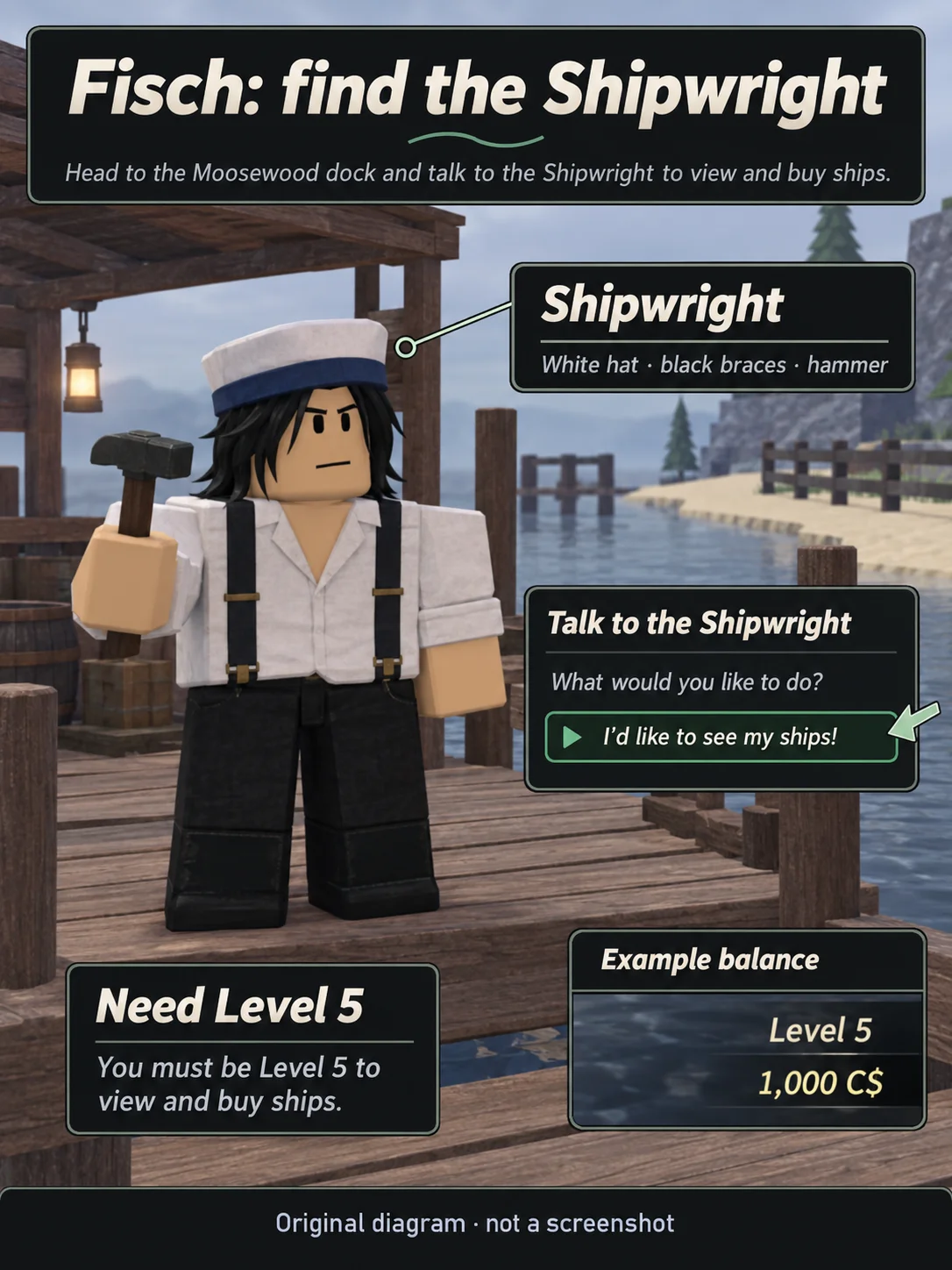
Original Fisch diagram identifying the white-capped Shipwright at the wooden docks, the ships dialogue option and the lower-right Level and C$ display.
Original diagram, not a screenshot. Match the white sailor cap, dark suspenders and hammer. Level and C$ are at the lower right; the balance shown is only an example.

2. Check the Rowboat and choose Purchase

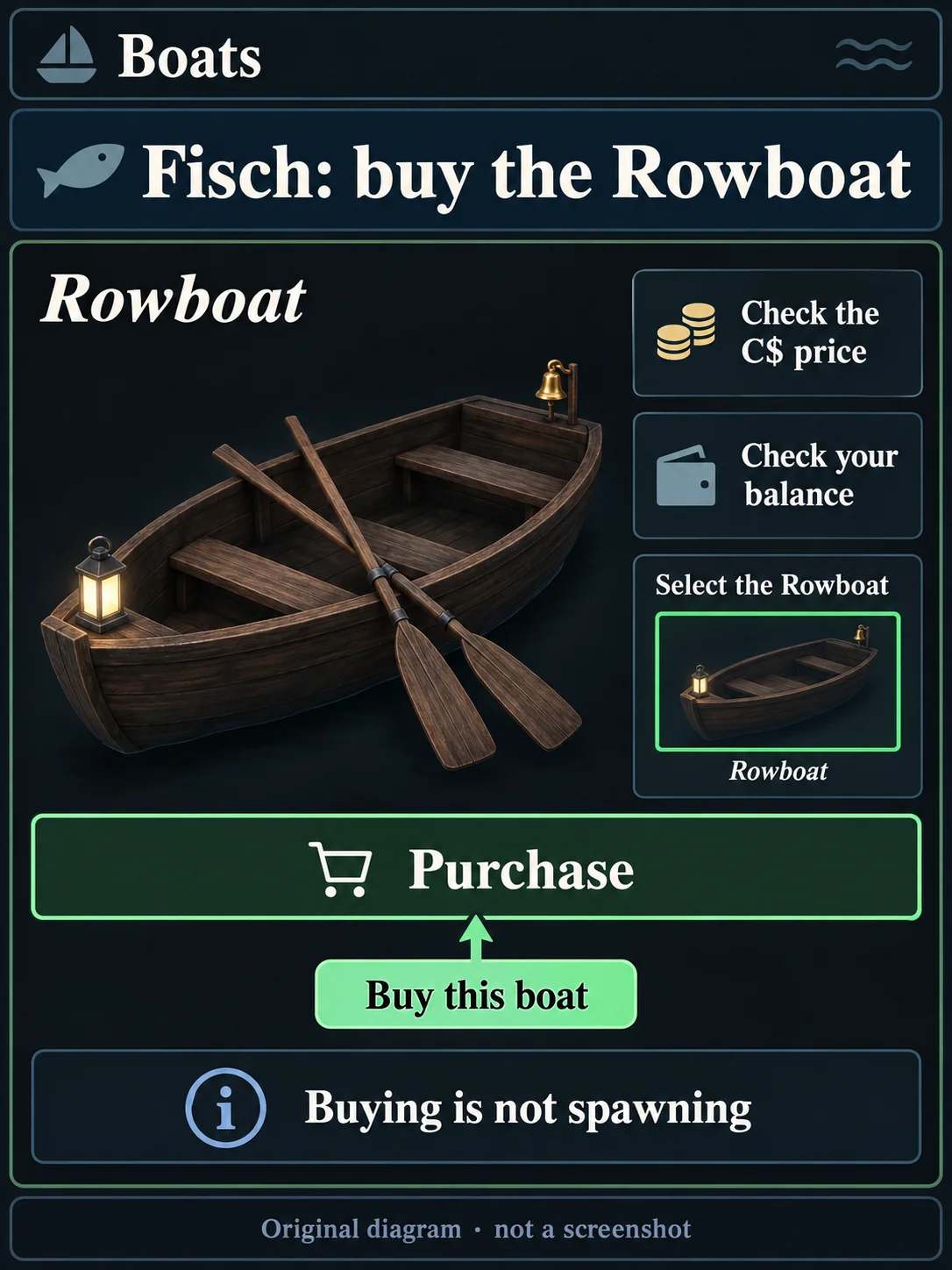
In the Boats selection, look through the boat cards or thumbnails for Rowboat. Select the one with that name. Its picture is a plain, low wooden boat with benches and oars; the lantern and small bell help you recognize it in our enlarged example below.

Read the C$ price displayed for that Rowboat, then compare it with your C$ balance. Use the price in your current menu rather than an old amount from another guide. If you have enough, select the green Purchase control on the Rowboat panel. Do not select a different boat just because its picture is beside it.

Original Fisch diagram showing the wooden Rowboat, the displayed C$ price, an example balance and the Purchase button in the Boats menu.
Original diagram, not a screenshot. Read the Rowboat’s current C$ price and your balance before choosing Purchase. Buying it does not put it in the water.

If Rowboat already says Owned, it is already yours: skip the purchase and go to step 3. Purchase buys ownership; it does not put the boat in the water.

3. Use Spawn and check the water beside the dock

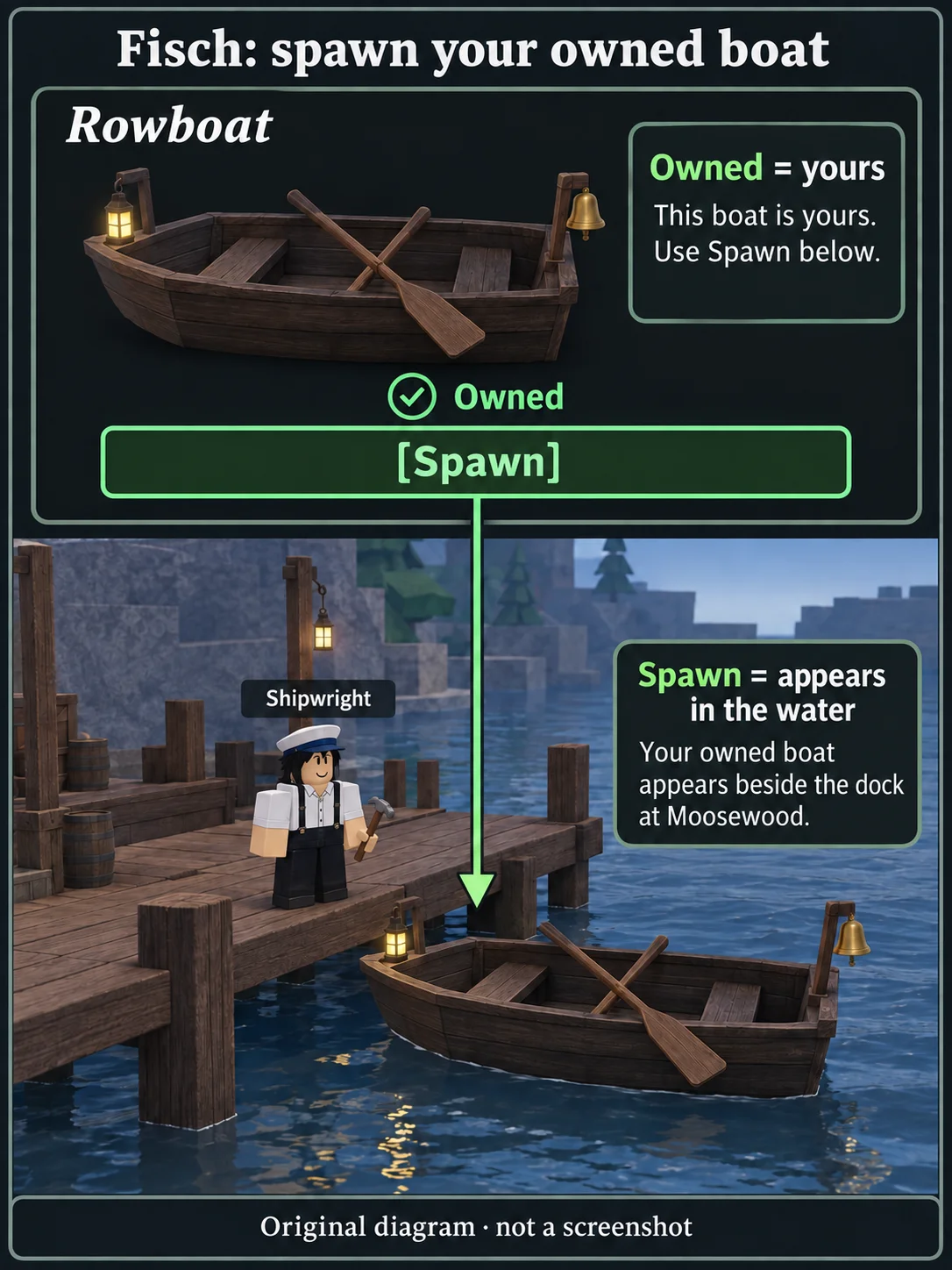
Keep the Rowboat selected in the same boat menu. Check for Owned on its panel, then select the green Spawn control at the bottom of that panel. You are still using the Shipwright’s boats menu—not the separate Inventory screen for carried items.

Original Fisch diagram linking the Owned Rowboat and its bottom Spawn button to a wooden boat appearing in the water beside the Shipwright’s dock.
Original diagram, not a screenshot. Owned means the Rowboat is yours. Spawn is the next action: look for it in the water beside the dock.

Look in the water directly beside the wooden dock, near the Shipwright. Your wooden Rowboat should now be there. That is the completion check: seeing Owned in the menu alone does not mean it has spawned. Stop here if you only wanted to buy and bring out your first boat.

If the boat does not appear

The seller will not let you use the service: check the lower-right Level number again. Level 5 is the access requirement, even if an individual boat’s information shows a smaller number.

Purchase is not available: compare the selected Rowboat’s displayed C$ price with your balance. If the panel says Owned, you should use Spawn instead of buying it again.

You are looking in Inventory: return to the white-capped Shipwright at the dock and choose “I’d like to see my ships!” Boat ownership and Spawn are handled there.

You paid but there is no boat in the water: reopen the Shipwright’s boats, select the Owned Rowboat and choose its bottom Spawn control. Check the water beside the dock, not the sandy beach.

More Fisch help

Need more C$ before buying? Use the Fisch money guide.

Once you own a boat, the rod-enchanting guide explains a separate trip to the Keepers Altar and the items it needs.

For reward promotions, check the Fisch codes guide. Codes are not the boat purchase menu.

The Fisch game hub brings together the boat, bait, money, rod and enchanting help.

Get Pixel Twelve's biggest stories first.

Add as a preferred source on Google