
Pixel Twelve
How to Revive a Teammate in 99 Nights in the Forest

How To

How to Revive a Teammate in 99 Nights in the Forest

A visual PC walkthrough for teammate revival: medicine recognition, camp Map markers, Sack transport and the held revive action.

By Nova RainesGame: 99 Nights in the ForestVerified Oct 1, 2026
Add to list
Guide Type
How To
Last Verified
Oct 1, 2026

Guide details

Overview

A visual PC walkthrough for teammate revival: medicine recognition, camp Map markers, Sack transport and the held revive action.

1. Make sure a living player has the right medicine

This is the standard teammate-revival method, using PC controls. At least one teammate must still be alive and able to reach the fallen player. You need a Bandage or Medkit; a Sack is useful if the body is somewhere dangerous. A special Medic class is not required.

A Bandage is a white rolled gauze item with a red band around its middle. A Medkit is a white case with a red stripe and a green cross. Either can revive a teammate, and the used item is consumed. A Sack or weapon cannot replace the medicine.
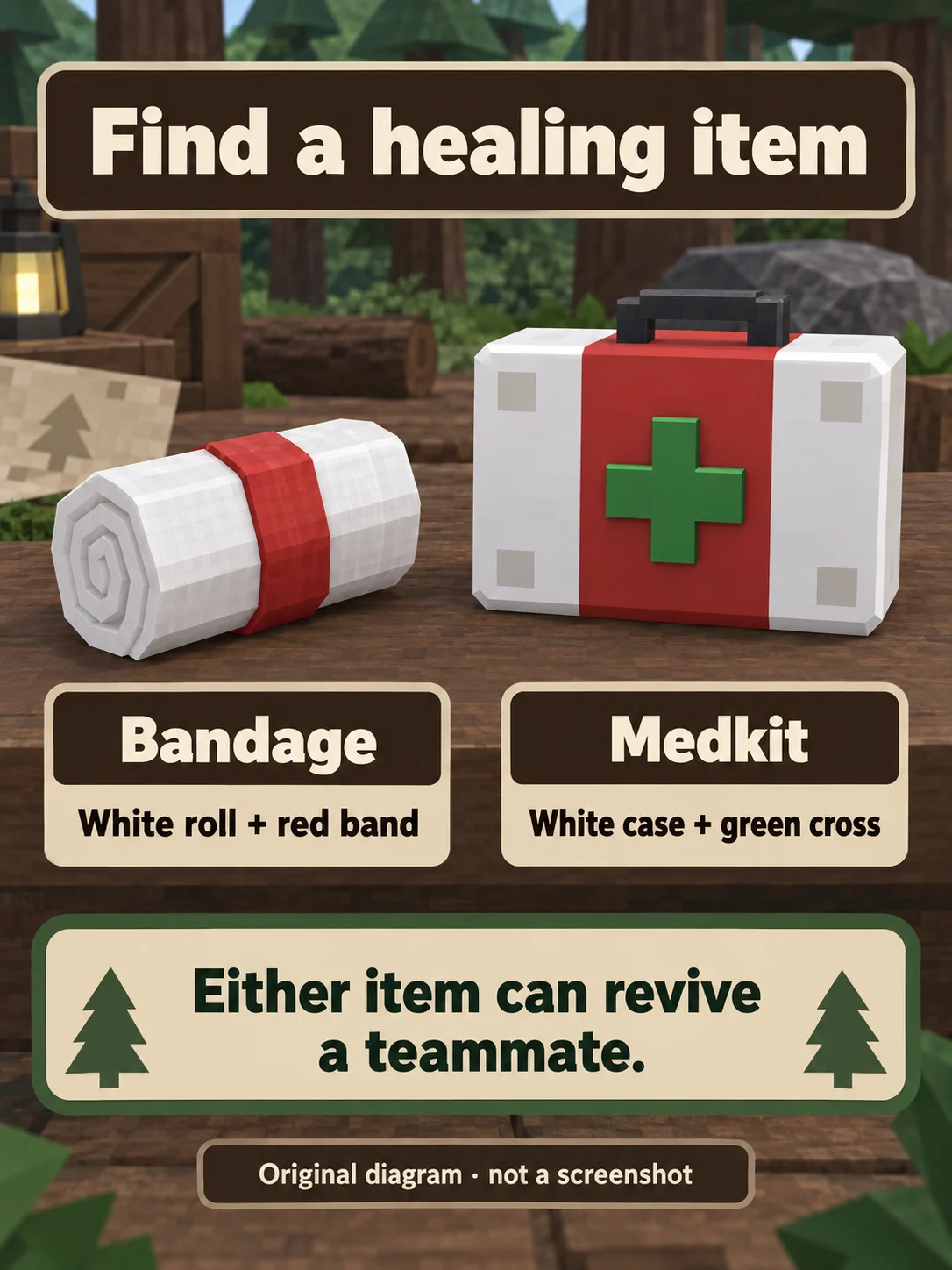
White Bandage roll with a red band and white Medkit case with a red stripe and green cross.
Original Pixel Twelve item-recognition diagram. Either the Bandage or the Medkit can revive a teammate; the green cross identifies the Medkit.

This walkthrough starts with one medicine item already collected. Bandages can appear in loot chests and sometimes at a Clinic; a chest is not a guaranteed Bandage. Keep a medicine item for the rescue instead of spending the last one on ordinary self-healing.
2. Find the player on the ground, not a floating diamond

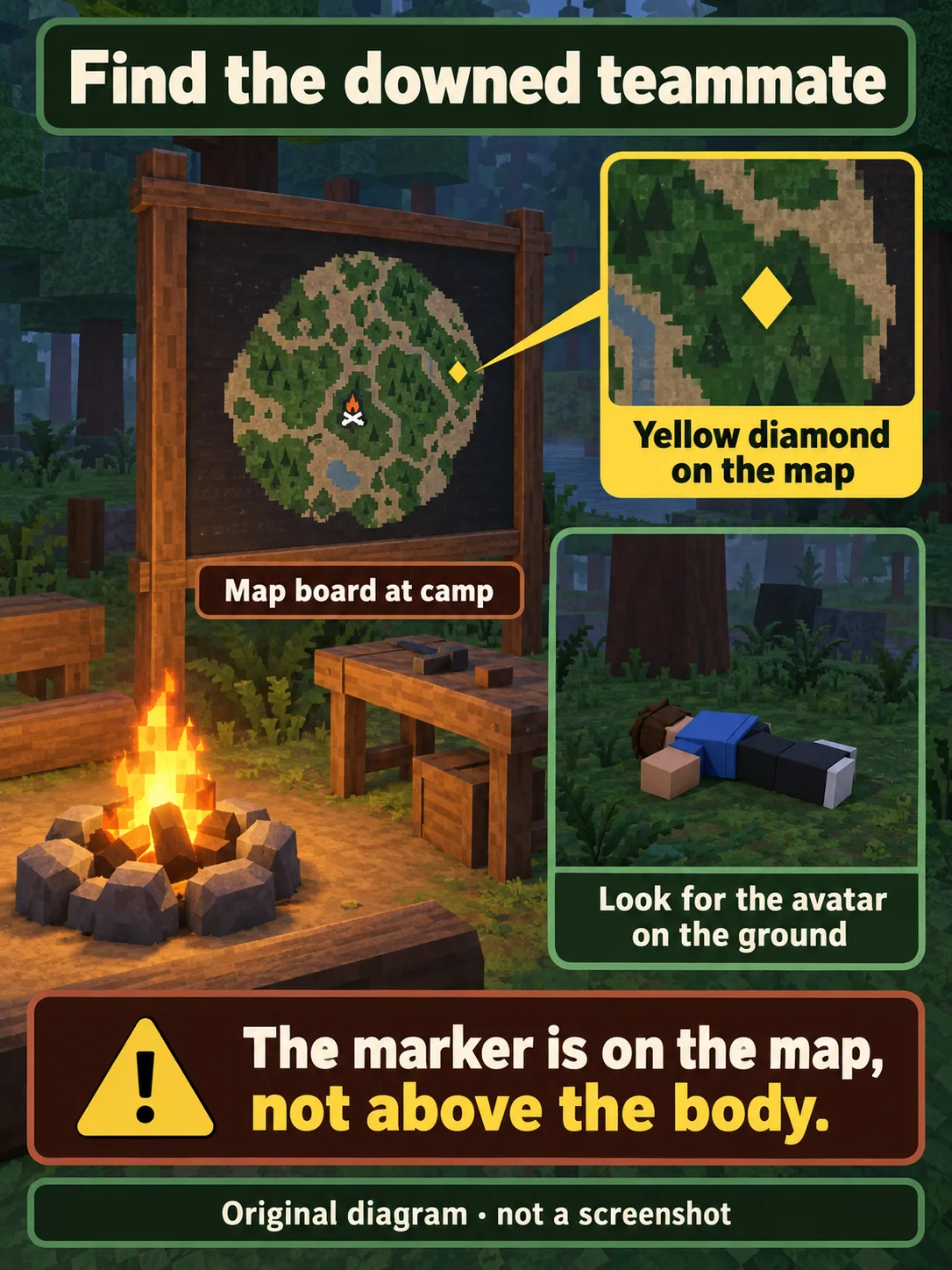
If the team has a Map at camp, look near the campfire for the upright wooden board with a dark map face. It is a piece of camp equipment, not a small minimap in the corner of the screen. A fallen teammate can be marked there by a yellow diamond. Use the diamond’s position relative to the camp marker to locate the area.

Upright wooden camp Map board with a yellow diamond and a separate fallen teammate on the ground.
Original Pixel Twelve diagram: the yellow diamond is a marker on the camp Map, not a floating marker above the body. The island layout is illustrative.

At that location, look for the teammate’s avatar lying on the ground. The yellow diamond is on the Map; do not expect it to float above the body. If the camp has no Map board, use the teammate’s last known position rather than searching for a nonexistent screen-corner map. Avoid beginning the rescue while nearby enemies can immediately attack you.

3. Select the Sack for transport, not the medicine yet

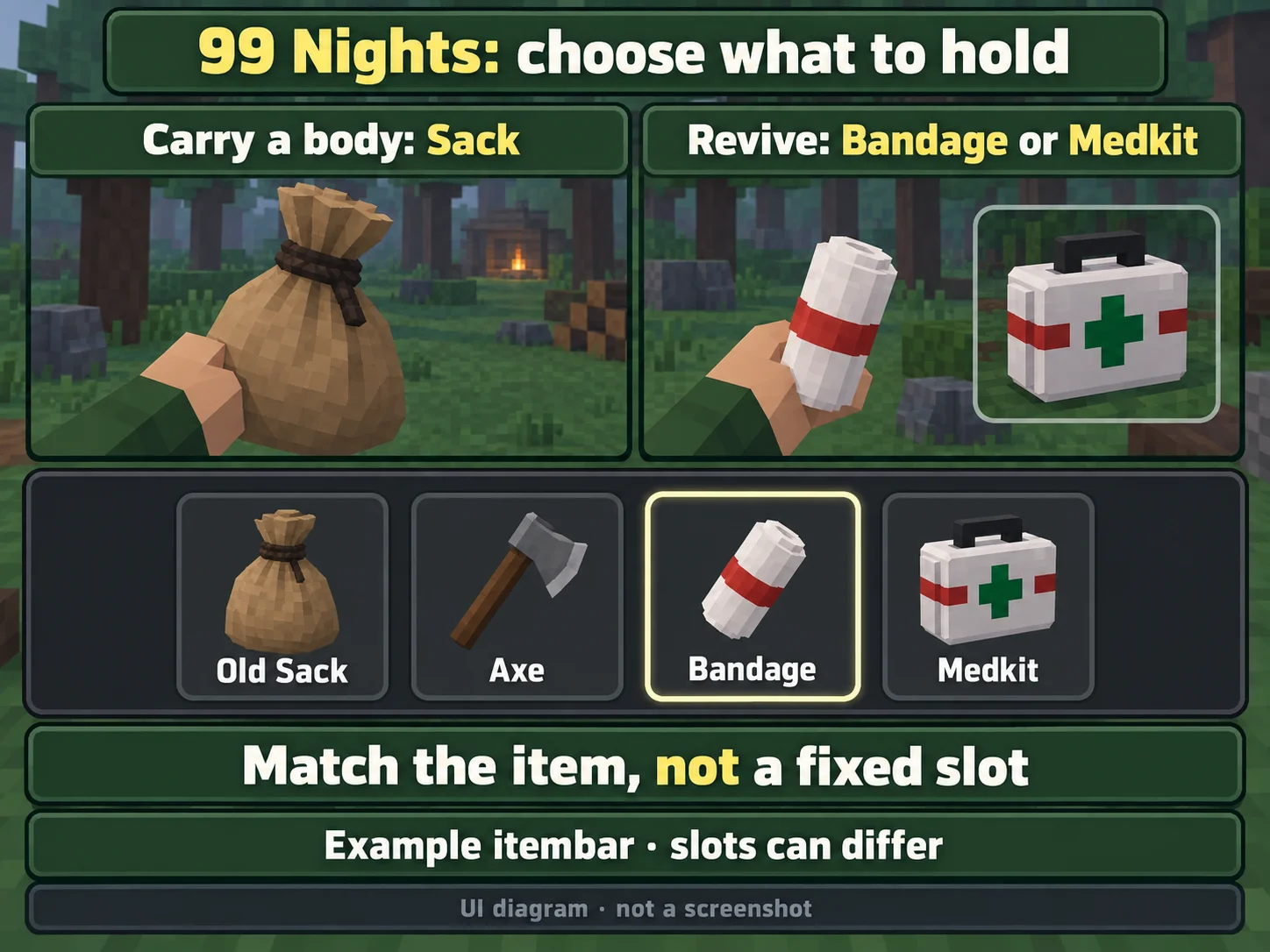
Look along the bottom item bar for the Sack you carry. The Old Sack looks like a light-brown cloth bag tied at the neck with a dark knot. Select its item slot and check that your character holds that bag. Slot order can change, so match the item picture instead of copying a fixed slot number.

Old Sack for carrying a body and Bandage or Medkit for revival, with an example item bar selecting the Bandage.
Original Pixel Twelve item-selection diagram, not a screenshot. This is an example item bar: match the Sack or medicine icon, not a fixed slot position.

The diagram shows the change you will make later: Sack for carrying, then a white/red Bandage or green-cross Medkit for reviving. The medicine should already be in your carried items before you begin the rescue; an item still lying on the ground is not one already equipped.

4. Bring the body to a clear place if needed

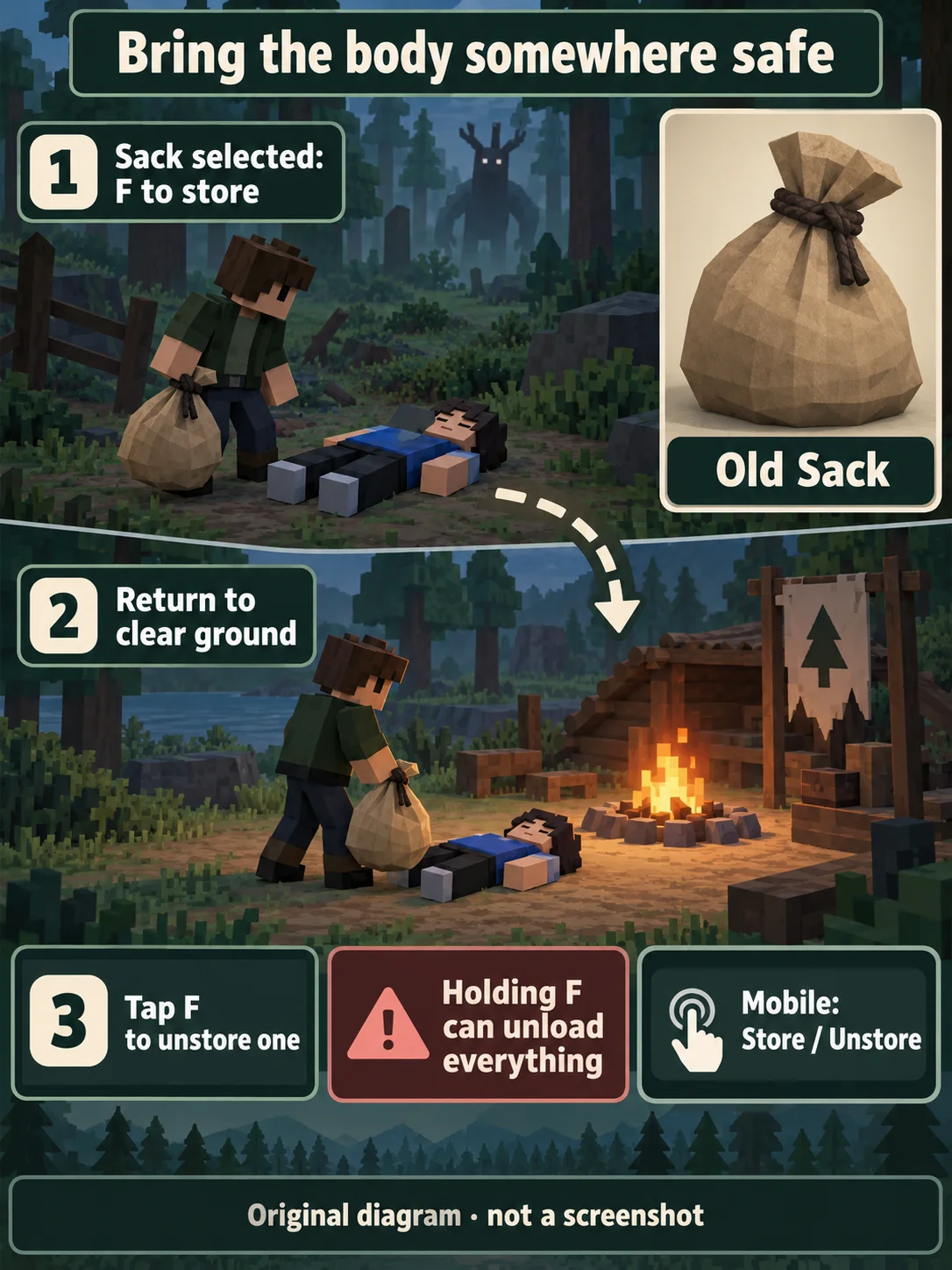
With the Sack held, stand close to the fallen avatar and aim at the body. Use F to store it. The body should no longer lie at your feet because it is now inside the Sack. If storing fails, check that the Sack has room and that it—not the axe or medicine—is selected.

Old Sack beside a fallen teammate, return to clear camp ground and tap F to unstore one item.
Original Pixel Twelve action diagram: store the body with the Sack selected, carry it away from danger, then unstore it. Holding F can unload the whole Sack.

Carry it to a clear patch of ground near camp, away from enemies and clutter. With the Sack still selected, tap F to unstore one item. The Sack unloads the most recently stored item first, so storing the body last makes retrieval easier. Holding F can unload everything instead; do not hold it just to drop one body. You are ready for the next step when the teammate’s avatar is lying on the ground again, not still stored in the Sack.

Moving the body is optional if the place is already safe enough. Transport alone does not revive the player, and the camp is not a promise of protection from every attack.

5. Hold the revive action beside the body

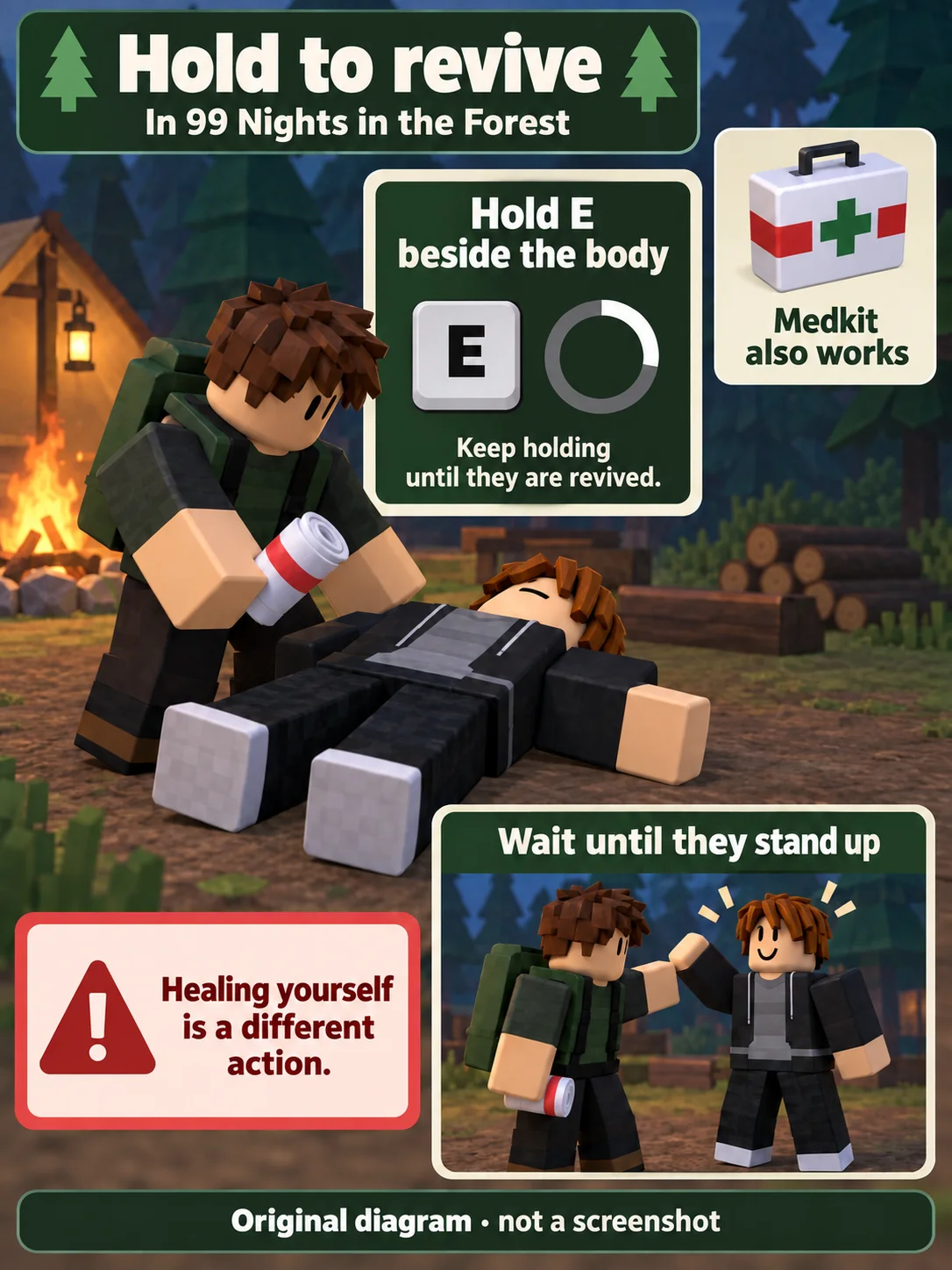
Return to the bottom item bar and select the Bandage or Medkit slot, matching the medicine pictured in step 1. Check that the white gauze roll or white case is now held, not the Sack. Stand next to the avatar on the ground and hold E to revive. Keep holding the interaction until it finishes; one quick tap is not the full action.

Player beside a fallen teammate holds the white red-banded Bandage, then the teammate stands after revival.
Original Pixel Twelve action diagram: select the medicine and hold the revive interaction beside the body. The E key and ring explain the action; they are not a captured game interface.

Watch for the teammate to stand up again. That is the useful completion check. The key and progress ring in our diagram explain the action; they are not a screenshot of the live prompt. Using medicine on yourself is a different action and will not revive a teammate still lying nearby.

If you cannot revive them

The body is still inside the Sack: unstore it onto clear ground before using the medicine beside it.

You hold a Sack, axe or another item: select the Bandage or Medkit by its picture in the bottom item bar, then move close to the fallen avatar.

Nothing completes after a tap: this revive action is held. Check the interaction beside the body and keep holding until the player stands.

You are dead in a solo run, or nobody remains alive: ordinary Bandages and Medkits cannot perform this teammate rescue by themselves. A separate paid-revive feature is not this medicine method.

More 99 Nights help

For the wider camp, loot and rescue priorities, read the 99 Nights beginner guide.

For free currency promotions rather than a rescue item, use the 99 Nights codes guide.

The 99 Nights game hub keeps the related guides together.

Get Pixel Twelve's biggest stories first.

Add as a preferred source on Google