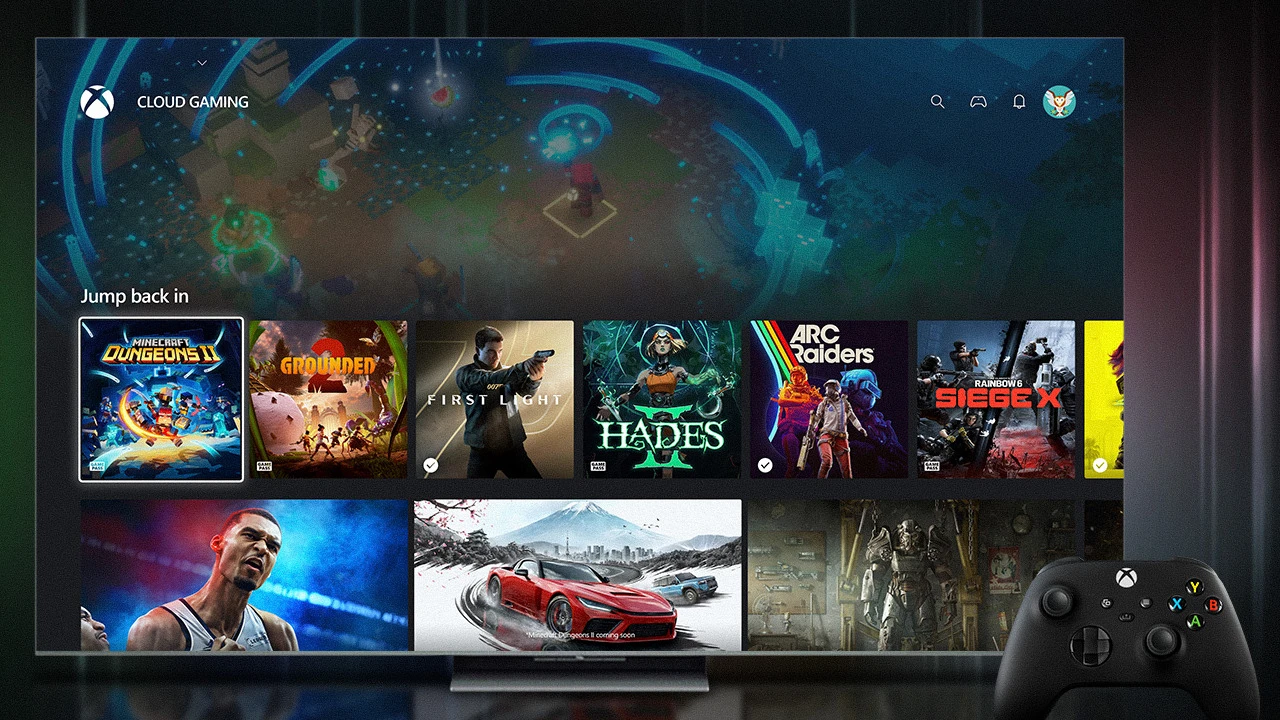
The Xbox app is coming to select TCL Smart TVs in phases over the next few months, covering more than 25 countries. Xbox and TCL have not published the model list, country list or exact launch date. Players will need an eligible TV, a compatible controller, a Microsoft account, a stable internet connection and Xbox cloud playtime.
This is cloud gaming, so no Xbox console is required and games are not installed on the television. The app streams supported titles from Microsoft’s servers. That makes the missing compatibility list the most important detail for TCL owners: a TV being recent, 4K or marketed for gaming does not confirm that it will receive the app.
Xbox app on TCL TVs: quick facts
- Release window: the coming months, through phased software updates.
- Supported models: not announced yet; Xbox and TCL only say select eligible TVs.
- Markets: more than 25 countries, but the complete country list is not public.
- Required hardware: a supported TCL Smart TV and compatible controller.
- Required access: cloud playtime through an eligible Game Pass plan or sold separately, depending on the rollout and market.
- Xbox console required: no; the television streams games through the Xbox app.
Which TCL Smart TVs will get the Xbox app?
No exact TCL model list has been announced. The September 4 statements refer only to “select” or “eligible” TCL Smart TVs. TCL says qualification depends on both its own product requirements and Xbox requirements.
TCL also says the app will arrive in phases, which means compatible televisions may not all receive it on the same day. Until TCL posts model numbers, owners should not assume that a particular C-series, QM-series, Roku TV, Google TV or older set is included. The reliable confirmation will be an official compatibility page or the app appearing through a normal software update.
When is the Xbox app coming to TCL TVs?
Xbox says “in the coming months.” TCL describes a future software update delivered in phases. Neither company has named a calendar date, first market or first group of models.
This is an announced rollout rather than an app that every TCL owner can install today. A third-party installation guide, sideloaded app or browser shortcut does not prove official support and may not provide the controller, video quality or account behavior Xbox intends for the TV app.
What do you need to play Xbox games on a TCL TV?
- Compatible television: an eligible TCL Smart TV that receives the official Xbox app update.
- Account: a Microsoft account used to sign into the Xbox app.
- Controller: a compatible Bluetooth controller. Xbox’s TV guidance includes Xbox controllers, PlayStation controllers and other verified models.
- Internet: Xbox recommends wired Ethernet or 5 GHz Wi-Fi and 20 Mbps download speed for TV play.
- Cloud access: included Game Pass cloud time or separately purchased cloud playtime for eligible owned games.
Connection speed is only one part of the experience. Distance from Microsoft’s data centers, Wi-Fi congestion, television processing and controller latency can affect image quality and response time. A wired connection is usually the most stable option when the television supports it.
Advertisement

Do TCL TV owners need Xbox Game Pass?
Game Pass is one route, but Microsoft’s announcement also mentions cloud playtime sold separately. Eligible Game Pass members receive a cloud-playable library and an hour allowance tied to their plan. The separate option is intended for players who want to stream eligible games they own without maintaining a Game Pass subscription.
From November 2026, Game Pass cloud time changes to monthly allowances: 15 hours for Ultimate, 10 for Premium and five for Essential. Microsoft has not announced the price of extra hours. Our Xbox Cloud Gaming limits guide separates the confirmed limits from the details that remain unknown.
The TCL rollout may vary by country, and Xbox says available features, games and purchasing options can differ by market. A subscription or owned game does not guarantee that every title supports cloud streaming.
How will you install the Xbox app on a TCL TV?
Wait for the official TCL software update. After the TV is confirmed eligible, install or open the Xbox app from the television’s normal app area, sign into the Microsoft account, pair a supported controller and select a cloud-playable game.
Xbox and TCL have not published TCL-specific menu steps yet. Those instructions can differ by operating system and model, so any detailed button sequence would be premature. Updating the TV firmware and keeping automatic app updates enabled will be the safest preparation once the supported list appears.
Can you play games you already own on a TCL TV?
Yes, but only when the game is eligible for Xbox Cloud Gaming and the account has cloud playtime. Ownership alone does not make every Xbox title streamable. Game availability can change by region, platform and entitlement.
Game saves, achievements and friends are tied to the Xbox account, so supported progress can travel between the TV, console, PC and other cloud devices. The app streams the Xbox version; it does not turn the TCL television into a Windows PC or install a local copy.
Will single-player, co-op and multiplayer games work?
Single-player and online multiplayer support depends on each game. The Xbox app is a delivery method, not a separate game mode. If a cloud-eligible title supports online co-op through Xbox services, that mode may work in the streamed version, subject to the game’s cloud feature list.
The TCL announcement does not promise local couch co-op, multiple-controller support or every peripheral. Players who need split-screen, steering wheels, flight sticks, cameras or other accessories should wait for Xbox’s model-specific compatibility guidance instead of assuming console-level support.
Does the Xbox app replace an Xbox console?
It removes the console requirement for supported cloud games, but it does not reproduce every console feature. Streaming depends on the internet, can use compressed video and may offer fewer accessories or audio options than a locally installed game.
For occasional play or a second room, the app can be a practical route into Xbox without another box under the television. Players who want unrestricted local play, offline access, physical discs or the broadest accessory support still need compatible hardware.
Xbox app on TCL TVs FAQ
Can I download the Xbox app on a TCL TV now?
Not as a universal official release. Xbox and TCL say the supported rollout is coming in phases over the next few months.
Is my TCL TV supported?
There is no official model list yet. Wait for TCL or Xbox to identify the eligible model number and market.
Do I need an Xbox Series X or Series S?
No. The app streams supported games directly to the TV, although a compatible controller and cloud access are required.
What internet speed does Xbox recommend for TV gaming?
Xbox’s TV page recommends wired or 5 GHz Wi-Fi and a 20 Mbps download connection. Faster service does not eliminate every latency or congestion issue.
For Microsoft’s broader hardware direction, read our Project Helix explainer. The separate Xbox Disc to Digital guide covers how physical ownership can connect to digital Xbox features.