Find Plokster on the Second Sea bridge, check the 2,500 Fragments cost, and rebuild your Blox Fruits stats without choosing the Robux reset.
What this reset does—and what you need
Plokster gives back the stat points you have spent so you can choose a new build. His reset costs 2,500 Fragments each time. It does not cost Robux, but it is not free: Fragments are a separate in-game currency, not the Money used for many other purchases.
This route starts in Kingdom of Rose in the Second Sea. If you are still in the First Sea, you cannot walk to this Plokster. A stat-reset code may be another option, but its reward and availability need checking before you use it.
Still working toward the Second Sea? Start with our Blox Fruits leveling guide. The steps below are for players who have already arrived there.
1. Save your current stats and check Fragments
Find the Menu button on the side of the game view and open it. Choose the yellow Stats button, beside Items. The Stats window has five named rows: Melee, Defense, Sword, Gun and Blox Fruit. Write down or capture the numbers before resetting so you have a record of your old build.
Find your Money counter—the value with a dollar sign. On PC, move the pointer over that value to reveal Fragments. On mobile and console, the Fragments value is shown directly. Read the number beside the purple ƒ symbol: you need at least 2,500. A large Money balance does not pay this fee.
Diagram: open Menu and choose Stats. On PC, hover over the Money value to reveal Fragments; mobile and console show that counter directly. The balances and menu drawing are examples, not your account or a current screenshot.
Decide which attack you will keep using before paying. The reset returns points, but it does not choose a new build for you. Your character level and item mastery—the separate progress that unlocks weapon or fruit moves—are not erased by reallocating stats.
2. Find the bridge between Kingdom of Rose and Green Zone
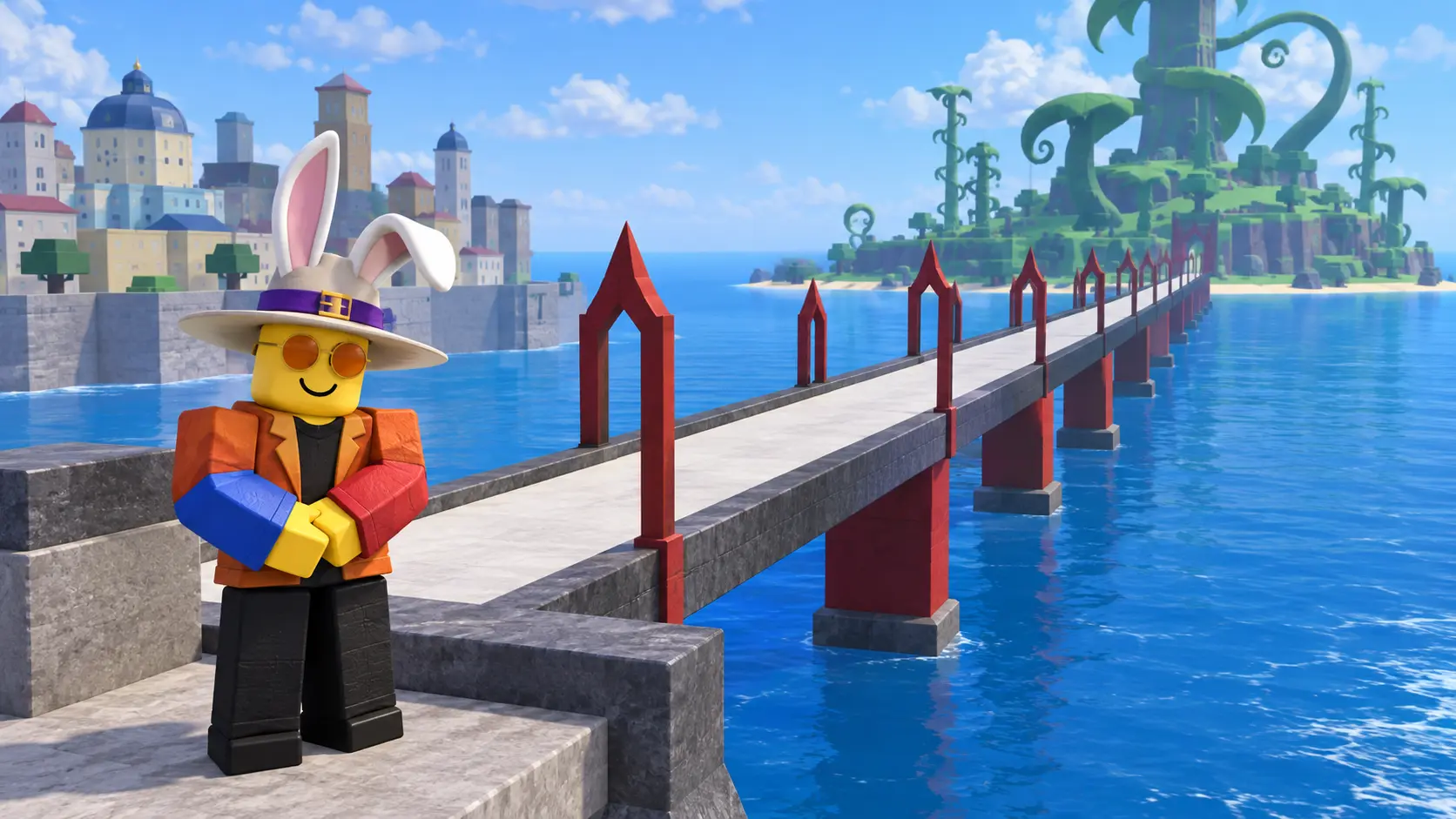
In Kingdom of Rose, look toward the edge of the city for a long pale bridge over the sea. Its white or light-gray walkway has repeated red metal arches. It leads toward Green Zone, the island with huge green plants. Use those landmarks to pick the bridge, not a boat dock or a city street.
Diagram: the Second Sea bridge links Kingdom of Rose and Green Zone. Use the white walkway, red arches and Bridge location label as landmarks, then look for Plokster. This original concept is not a current screenshot, exact map or fixed NPC coordinate.
Walk onto that path. The location name Bridge appears near the top of the screen when you enter the area. Follow the walkway and look for the NPC named Plokster. An NPC is a game-controlled character you can talk to; do not try to buy the reset from another player.
3. Recognize Plokster and accept only the right offer
The Second Sea Plokster wears a pale wide-brimmed hat with bunny ears, orange glasses and an orange-red jacket. Move close to him, check that his name is Plokster, and select the character to open his conversation. This guide uses his Second Sea appearance, not the different outfit worn in the Third Sea.
Diagram: identify Plokster by name and appearance, then read the 2,500 Fragments offer. The weather line signals an insufficient balance. This is an original character and instruction drawing, not the exact dialogue window or a screenshot.
Read the offer before accepting. It says he can refund your stat points in exchange for 2,500 Fragments. Choose the dialogue option that accepts that offer only when you are ready to rebuild. Each later reset costs another 2,500; the first payment does not unlock unlimited free resets.
If he only says “The weather is nice today,” your Fragments balance is below 2,500. Close the conversation and check the purple counter again. More Money will not fix that shortage. You can return later or check whether an unused stat-reset code is available.
4. Rebuild in Stats without pressing Refund
Open Menu → Stats again. Look for Stat Points near the bottom: this is the number of points still available to spend. The points you assigned have been returned. The basic stat rows start from level 1, not zero; mastery and equipment bonuses can make displayed totals differ.
Find Custom Amount near the top-right of the Stats window and set it to 1. Then use the yellow + button at the right of the row you want to increase. With an amount of 1, one press spends one point. Check that the chosen row goes up and Stat Points goes down before spending more.
Diagram: set Custom Amount to 1, then use the + button on the row you chose. The colored rows explain each stat; watch Stat Points decrease after a spend. This simplified original drawing does not show a recommended max-level build or your actual values.
Melee supports your energy and fighting-style damage. Defense increases health. Sword, Gun and Blox Fruit increase damage for those three attack types. Choose the damage type you actually use, while keeping enough health and energy for your usual quests; splitting points evenly into attacks you rarely use can weaken your main attack.
Do not press Refund to finish this Plokster reset. That button opens a separate reset route associated with the paid Shop option. The + buttons spend returned points. You can leave some points unspent while deciding, then test the new setup against familiar quest enemies before committing the rest.
What if you want a reset without spending Fragments?
Check our Blox Fruits codes page for entries specifically marked as stat-reset rewards. EXP codes do not reset stats. Codes can expire or have already been used on your account, so a listed code is not a promise that it will work for you.
For the wider game, return to the Blox Fruits game hub. Keep the First Sea beginner guide separate from this Second Sea NPC route.
The step images above are original Pixel Twelve diagrams based on observed game references. They are not screenshots or proof of an in-game purchase, and the bridge view is not a map drawn to scale. Menu placement can change between devices and updates; read the named control and the cost before confirming.
Get Pixel Twelve's biggest stories first.
Utility
More Guides for Blox Fruits
More practical guides, explainers, and useful next reads connected to Blox Fruits.