Pixel Twelve
Hearthstone Beginner Guide: Apprentice Track, Free Deck and Your First Standard Match

How To

Hearthstone Beginner Guide: Apprentice Track, Free Deck and Your First Standard Match

A visual, beginner-friendly route through Hearthstone onboarding with five official interface screenshots and current notes on renamed Ladder Ready Decks.

By Bertha HigginsGame: HearthstoneVerified Sep 28, 2026
Guide Type
How To
Last Verified
Sep 28, 2026

Guide details

Overview

A visual, beginner-friendly route through Hearthstone onboarding with five official interface screenshots and current notes on renamed Ladder Ready Decks.

Before you start: which screen should you expect?

Hearthstone is a card game: you play cards from a deck, summon minions and try to bring the other hero down to zero Health. The first screens teach you the basics. You do not need to buy cards or know World of Warcraft to start.

  • Brand-new player: finish the tutorial, then follow the Apprentice Track. It introduces the regular card game and unlocks more of the Tavern as you go.
  • Returning player: your account may already have those early steps complete. Blizzard says an account that has not played for at least 90 days can receive returning-player rewards, including a deck offer. Do not restart your account just to follow the new-player route.
  • PC and phone menus can have different spacing. Look for the names and pictures described below instead of expecting every button at exactly the same screen coordinate.

This guide covers the regular Hearthstone card game, especially Standard. Battlegrounds is a different mode with its own hero-selection and minion-shopping rules. If you open Battlegrounds by accident, go back to the main menu before following these steps.
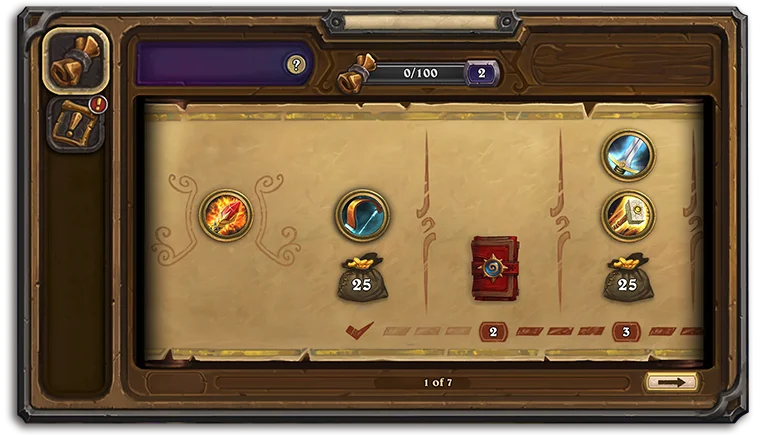
1. Finish the tutorial and recognise the Apprentice Track

Official Hearthstone Apprentice Track screen: a 0/100 progress counter sits at top, a row of reward symbols crosses the center, and a page arrow is at lower right.
Find the progress number along the top and the line of reward symbols across the page. This is the Apprentice Track, not a deck list. The small page arrow at bottom right moves to more track pages.
  1. Open Hearthstone from the Battle.net launcher on PC or its app on phone/tablet. If this is a new account, play the tutorial the game presents. It teaches you to drag a card from your hand onto the board and end a turn. When the tutorial ends, look for a progression page with a number at the top and reward icons spread across it.
  2. In the picture, the narrow bar across the upper edge reads 0/100, and reward symbols sit on a parchment-like page below. That is the Apprentice Track. Your number and rewards may differ because the screenshot is an example from Blizzard, not a promise of today's exact rewards.
  3. Play the Standard matches or tasks the track offers. When a reward lights up, open the track again, select the available symbol and follow its claim prompt. Use the arrow at the lower right of the pictured page to check later pages before assuming the track ended.

If you can already enter Ranked Standard and see no Apprentice Track, you may be on an older or returning account. Continue to the deck section instead of looking for an onboarding screen your account has already completed.

2. Find the Tavern Guide quests beside the track

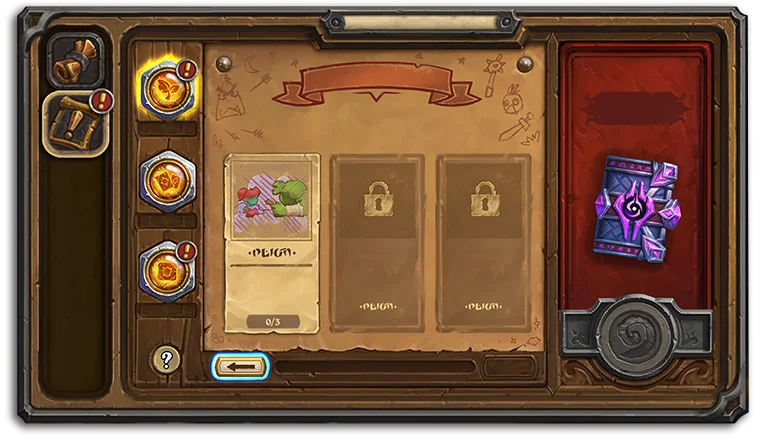
Official Hearthstone Tavern Guide screen with a vertical strip of round quest icons at left, three large quest cards in the middle and pack rewards on the right.
The glowing round icons in the left strip change the guide page. The large card in the center is the task to read; the pack art at right is a reward, not the button to start a match.
  1. While on the Apprentice Track, look down the left edge for a second round, orange-gold icon. Select it to open the Tavern Guide. In Blizzard's example, this switches from the track page to a panel with three tall quest cards.
  2. Read the task text on the leftmost unlocked card. The two cards to its right are shown with locks, so you cannot do them in that order yet. A small counter near the bottom of the open card shows progress. Complete the action named on that card in the game, then return here to claim the reward when it is available.
  3. If you cannot tell what the task wants, read its full card text before choosing a mode. The purple card-pack art on the right is the reward area; clicking it first will not teach you how to complete the quest.

Blizzard says the Tavern Guide runs alongside the Apprentice Track. It is a teaching quest path, not a second deck you must build. The precise quest names and reward amounts can change, so use the current in-game card text as the final instruction.

3. Choose a deck to test before you claim one

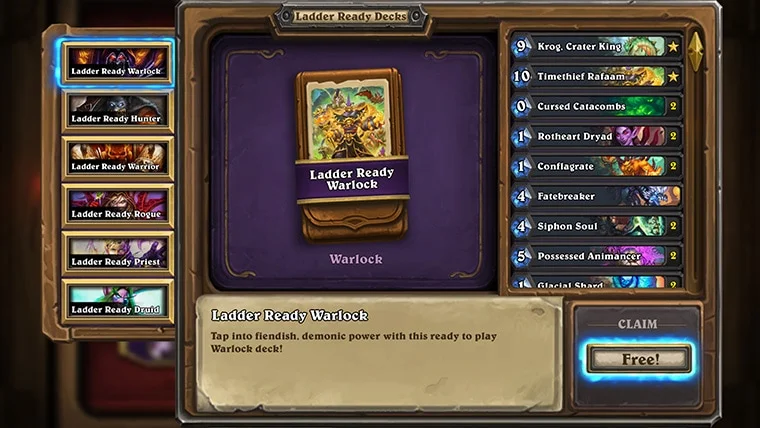
Official 2026 Ladder Ready Deck screen: six deck choices appear in a left column, one deck is selected in the center, its card list appears at right, and a Claim Free button is at lower right.
On the Ladder Ready Deck screen, compare the choices down the left and inspect the selected deck in the center and right. The glowing CLAIM Free button finishes your choice; do not press it before testing the options.
  1. When your new account completes the tutorial and Apprentice Track, look for the deck offer. Returning players who qualify may see one sooner. The current name is Ladder Ready Decks; older screenshots or posts may call them Loaner Decks. Blizzard changed the name, not the idea of trying a deck before choosing one to keep.
  2. On the example screen, deck choices run down the left. Select one there, then look to the middle for the larger class picture and to the right for its card list. The example highlights a Warlock deck. Your account can show different classes because Blizzard updates the choices.
  3. Try the available decks in matches before pressing CLAIM Free at the lower right. Blizzard's 2026 returning-player guide describes a seven-day trial window. Once you decide, select the deck you want to keep and follow the claim confirmation. Claiming early can end access to the other trial decks.

A Ladder Ready Deck is a ready-made group of cards. You can play it without understanding every card on day one. During the trial, ask a simple question after each match: did the deck give you an early card you could play, and did you enjoy its way of winning? That is more useful than choosing only by the hero portrait.

4. Select a Standard match with the deck you chose

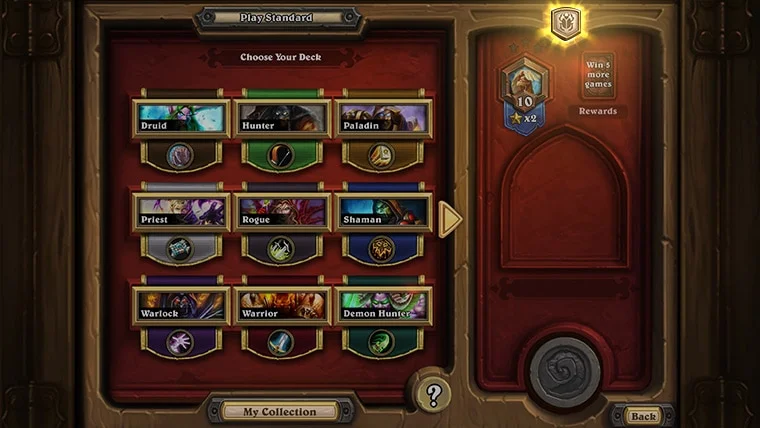
Official 2026 Hearthstone Play Standard screen: Choose Your Deck is at the top, a grid of deck portraits fills the center, My Collection is at bottom and the right panel shows wins and rewards.
Check the top bar for Play Standard and Choose Your Deck. Select a deck portrait in the center grid; My Collection is the button below the grid if you need to change decks.
  1. Back at the main menu, choose Play, then Standard. On the next screen, check the small heading above the cards: the example says Play Standard and Choose Your Deck. If it says Battlegrounds or another mode, go back one screen.
  2. Select the deck portrait you want from the middle grid. Your Ladder Ready Deck can appear here after it is available on your account. The picture shows a grid of class portraits and names; the right side shows progression information, not extra decks.
  3. If the deck is missing, select My Collection below the grid. Look under My Decks for the deck you claimed or currently have on trial, then return to Play Standard. Blizzard's 2026 guide also says My Collection > New Deck lets you choose a class and a recommended deck if you need a fresh one.
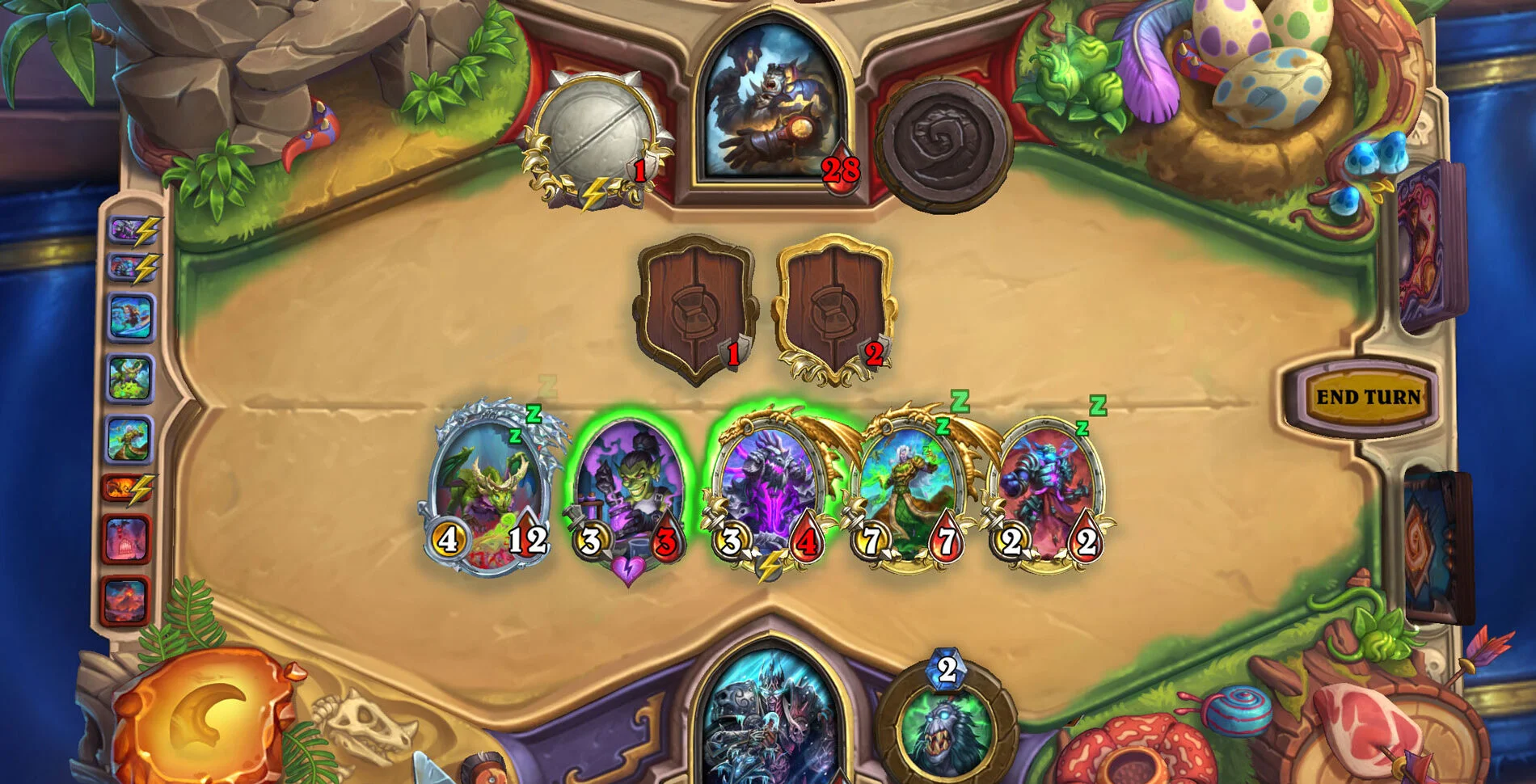
Official 2026 Hearthstone match screenshot with the opponent hero at top, player hero at bottom, minions on both halves and a yellow End Turn button at right.
This is a later match, not your starting hand. Your hero is below, the opponent is above, and the yellow END TURN button is on the right. The small Z above some minions means they are not ready to attack yet.
  1. Start a match only after the chosen deck is highlighted. Once inside, find your hero at the bottom and the opponent at the top, as in the picture. Your minions appear on your half of the board; an enemy's minions appear above. Follow the live tutorial prompts to play your first card. The yellow END TURN control sits on the right. Press it when you have finished the actions you want for that turn.

You can begin in Casual to practice without worrying about rank, or use Ranked when ready. Both are regular Hearthstone, unlike Battlegrounds. The pictured deck grid is a March 2026 example; its exact class lineup can rotate, so follow the labels on your live screen.

If a button or reward is missing

  • No Apprentice Track: first check whether your account already completed it. A returning account does not have to replay it.
  • No Ladder Ready Deck offer: check whether the new-player track is complete, or whether a returning account meets Blizzard's 90-day eligibility rule. A permanent deck you already claimed will be in My Collection.
  • Your deck is not in the Standard grid: confirm you did not switch to another mode, then check My Collection > My Decks. Current Standard card eligibility can change with set rotation.
  • Screenshot looks different: Blizzard updates rewards, deck classes and menu art. Match the written heading (Apprentice Track, Tavern Guide, Ladder Ready Decks or Play Standard), then follow the current in-game prompt.

Do not pay for a bundle merely because a button is hard to find. Hearthstone is free to play, and this route is about the tutorial and deck offer, not a shop purchase.

Get Pixel Twelve's biggest stories first.

Add as a preferred source on Google