Pixel Twelve
It Takes Two Friend’s Pass: How to Invite a Friend on Each Platform

How To

It Takes Two Friend’s Pass: How to Invite a Friend on Each Platform

Step-by-step It Takes Two Friend’s Pass setup for Steam, EA app, PlayStation, Xbox and Nintendo Switch, with official diagrams and fixes for missing invites.

Game: It Takes TwoVerified Sep 23, 2026
Guide Type
How To
Last Verified
Sep 23, 2026

Guide details

Overview

Step-by-step It Takes Two Friend’s Pass setup for Steam, EA app, PlayStation, Xbox and Nintendo Switch, with official diagrams and fixes for missing invites.

Start here: one full copy or just the first chapter

To play the whole story online, one person needs the full It Takes Two game. That person is the host. The second person downloads the free Friend’s Pass on their own device and accepts the host’s invite. If neither person owns the game, both can use Friend’s Pass to try the first chapter, but the rest stays locked.

It Takes Two is built for two people. For online play, both should install the correct version for their device and sign in to the account they use on that platform. If you are together on one system, choose local couch co-op instead of sending an online invite; two controllers are needed and EA says couch co-op works offline.
Before you download: match the game, store and account

  1. Ask which person owns the full game and which person needs the free pass. The pass is a separate free listing; do not buy a second full copy by mistake.
  2. Check where the owner plays: Steam, EA app, PlayStation, Xbox or Nintendo Switch. Open the matching section below. On the guest’s device, open that platform’s official store and search for the exact free Friend’s Pass listing described there.
  3. On the owner’s game main menu, look for the online-play invitation route. Both players should keep the game open and be signed in while the owner sends the invite.

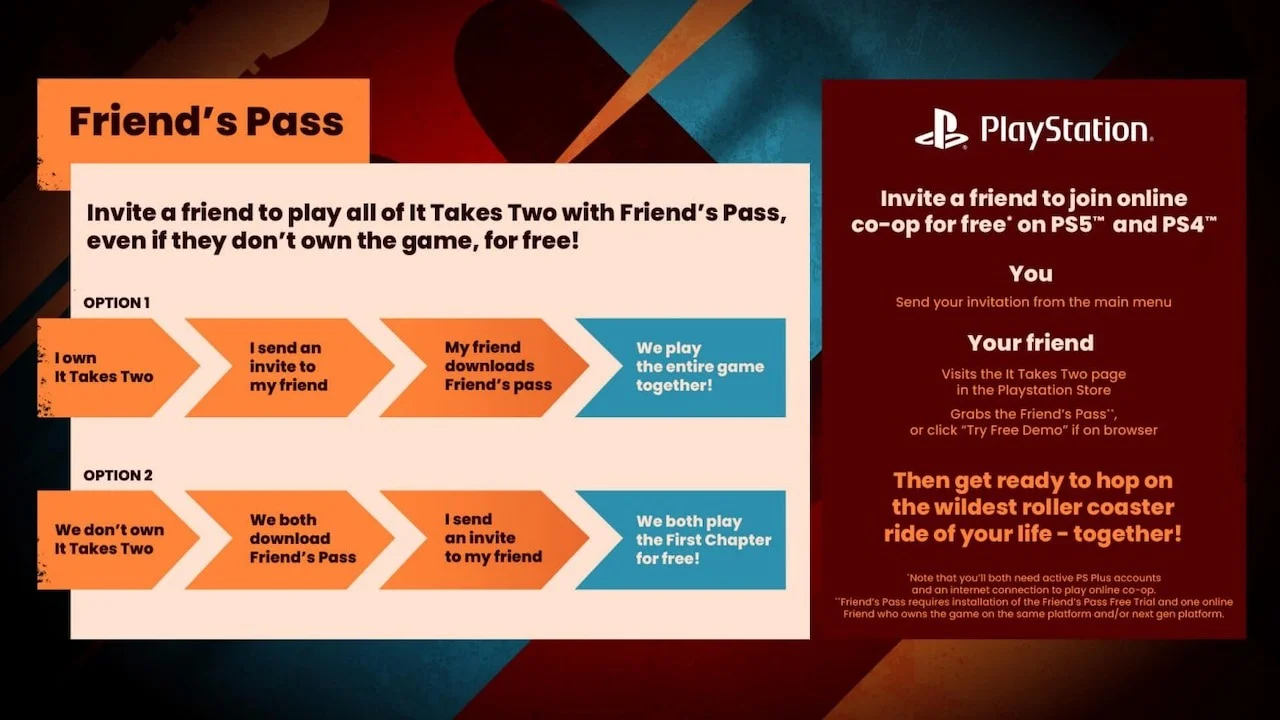
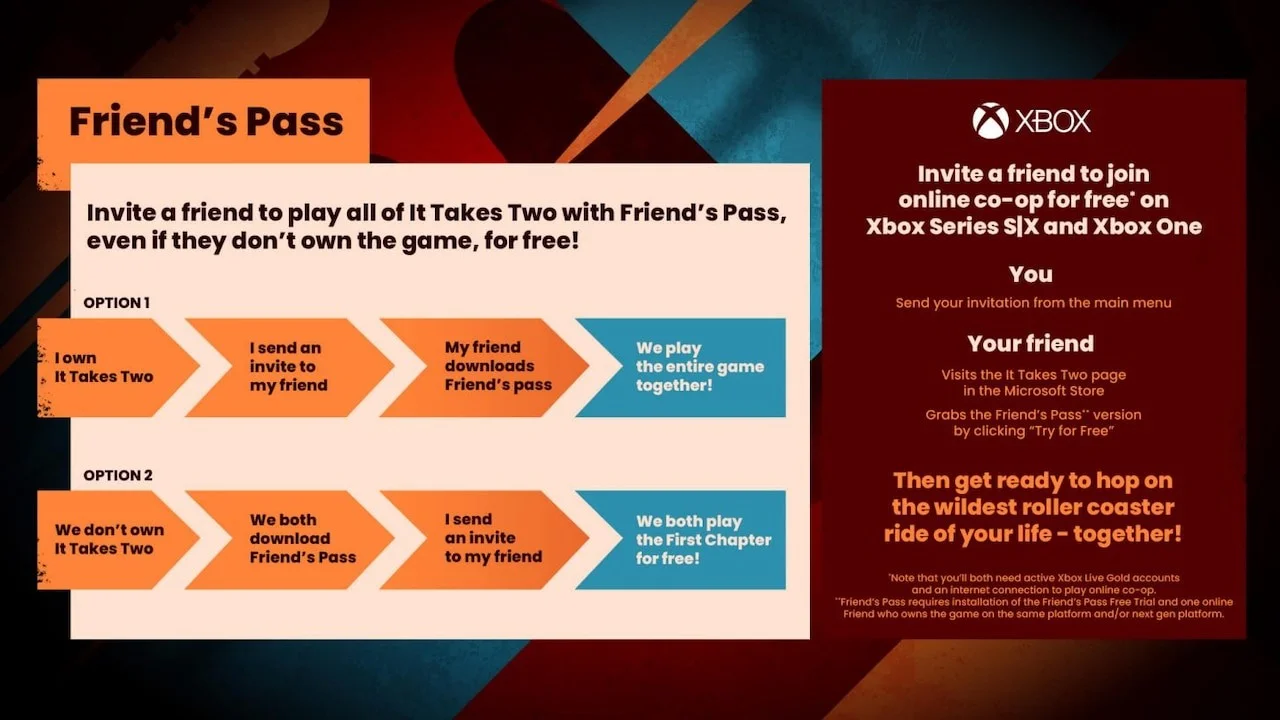
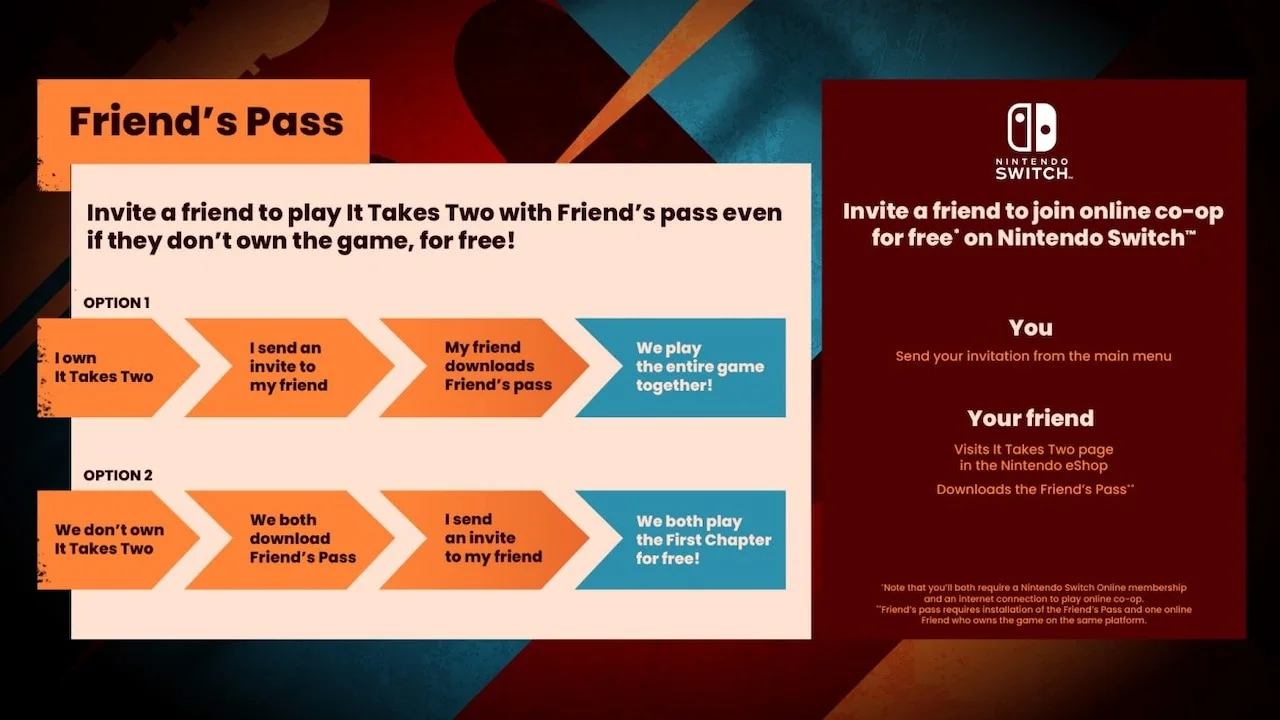
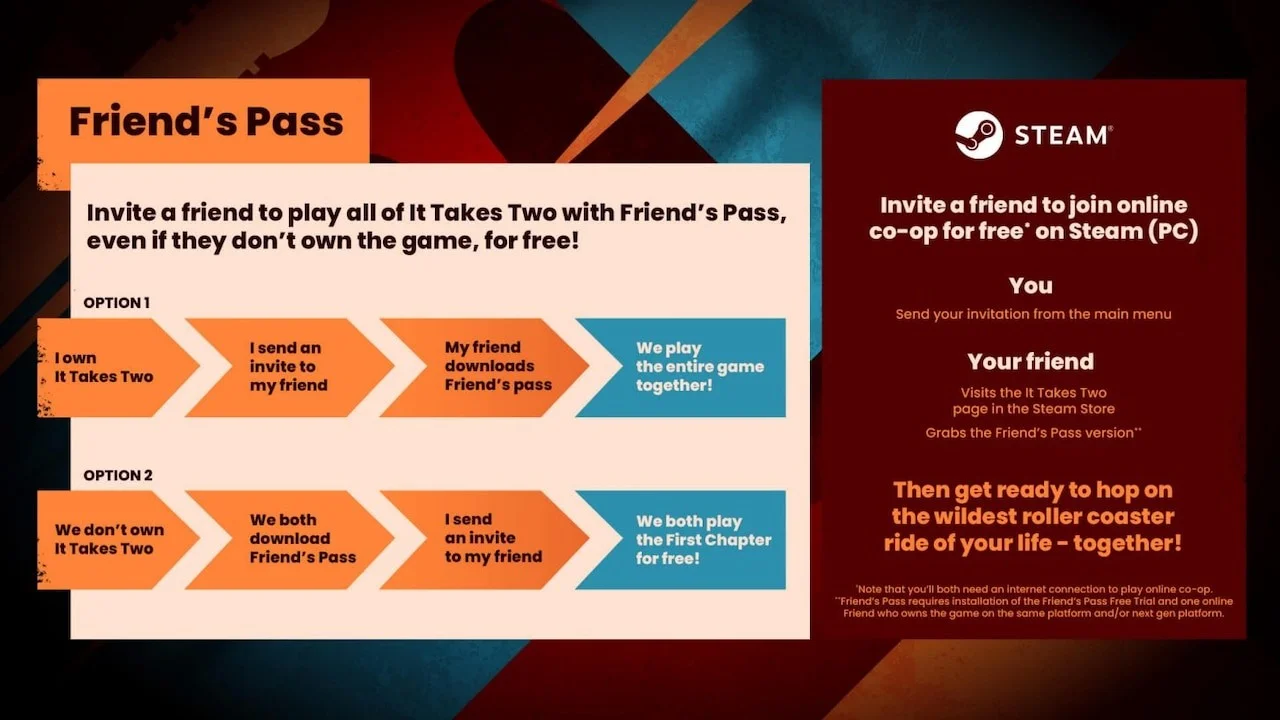
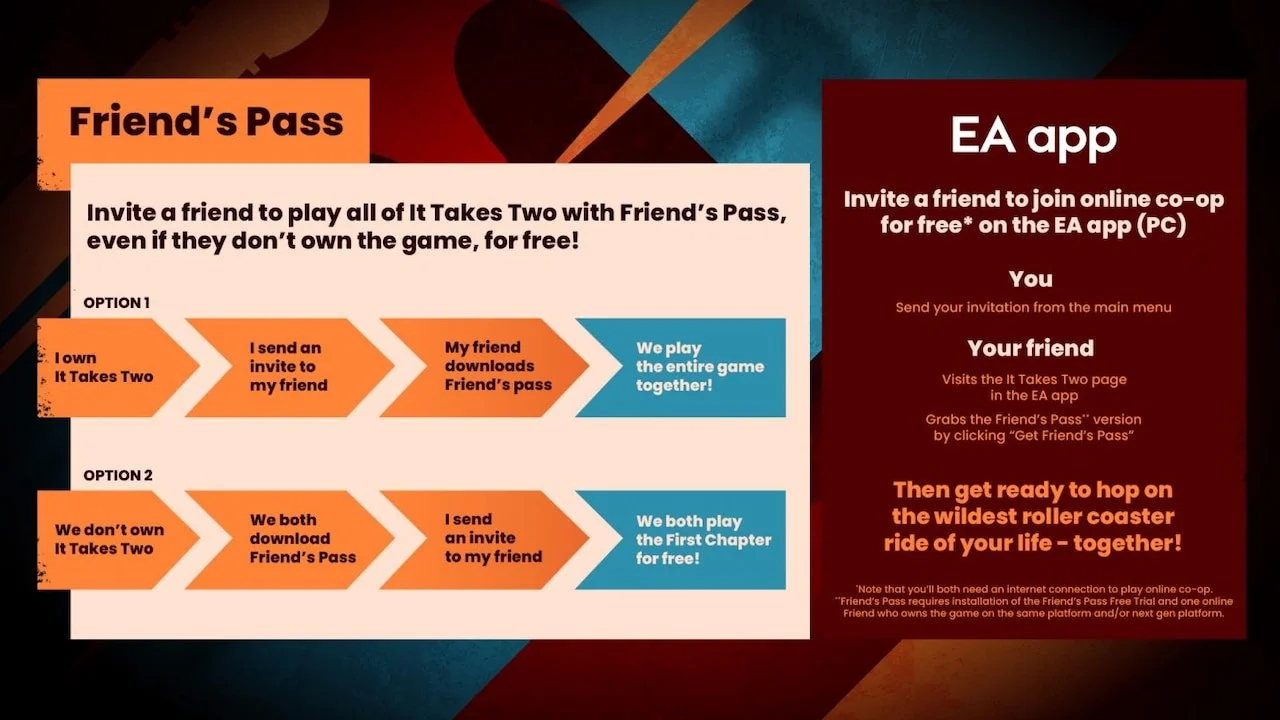
The official EA diagrams below show two paths. Follow Option 1 on the left when one person owns the game; follow Option 2 only when both are using the free first-chapter trial. The right panel of each diagram names the platform and tells the owner and guest what to do.

Steam on PC: install the current free pass

EA Friend’s Pass flowchart for Steam, showing full-game host, free guest download and first-chapter trial.
Steam: the left flow shows one full copy plus one free pass. The right panel says the owner sends the invite and the guest gets the pass through Steam.

Guest download: open Steam Store and search “It Takes Two Friend’s Pass”; choose the Official Steam Friend’s Pass listing. Look for “Play It Takes Two - Friend’s Pass” and “Install Game,” not the paid full-game purchase button.

  1. Guest: open the free listing while signed into Steam, select Install Game and wait for the Friend’s Pass download to finish.
  2. Owner: launch the full game and choose Play Online from its main menu. Invite the guest through your Steam friends list; the guest accepts while the pass is running.

EA says the newer Steam Friend’s Pass can use Steam invitations directly. If an older pass still starts the EA app, reinstall the current Steam pass or use the in-game EA Friends List with the older version. An EA account may still be requested for the game’s online services even though the EA launcher is no longer required for the newer Steam pass.

EA app on PC: use the EA invitation path

EA Friend’s Pass flowchart for the EA app on PC, with owner and invited guest steps.
EA app: the guest finds Friend’s Pass on the game’s EA app page; the owner sends the invitation from the game menu.
  1. Guest: in the EA app, search for It Takes Two, open its page and choose the Friend’s Pass version. Confirm that the app labels this download as free before installing.
  2. Owner: open the full game, choose its online-play route from the main menu and use the in-game EA Friends List to invite the guest.

If the owner bought the game on Steam but the guest uses the EA app, EA’s Steam update says to select the EA Friends List in-game rather than relying on a Steam-only invite. Both people need the game running to see EA invitations.

PlayStation 5 or 4: choose the Free Trial listing

EA Friend’s Pass flowchart for PS5 and PS4 showing host invite and PlayStation Store download.
PlayStation: the official diagram separates the paid owner from the guest who takes the free pass from PlayStation Store.

Guest on PS5: open PlayStation Store and search “It Takes Two Friend’s Pass”; choose PS5 Friend’s Pass. Its store page says “Free Trial” and “Add to Library.”

Guest on PS4: open PlayStation Store and search “It Takes Two Friend’s Pass”; choose PS4 Friend’s Pass. Check that the version says PS4 before adding it.

  1. Guest: add the free trial to the same PlayStation account you will use to play, install it and start the pass.
  2. Owner: open the full game’s online option, invite the guest and wait for the accepted invitation before beginning. EA lists PS4-to-PS5 play as a same-family, cross-generation combination.

The PlayStation Store currently marks PS Plus as required for online play. Two people on the same console can use local co-op instead.

Xbox One or Series X|S: check the free version

EA Friend’s Pass flowchart for Xbox One and Series X|S with the free Microsoft Store path.
Xbox: the official diagram shows the owner inviting from the game and the guest downloading the free store version.

Guest download: open Microsoft Store on Xbox and search “It Takes Two Friend’s Pass”; open the Official Xbox Friend’s Pass listing. The listing says “Free+” and identifies Xbox One and Xbox Series X|S compatibility.

  1. Guest: choose the free Friend’s Pass listing, install it on your Xbox and sign in with the account that will accept the invitation.
  2. Owner: launch the full game, use its online invitation route and select the guest from your Xbox friends. Xbox One and Series X|S are in the same Xbox family for this pass.

If a disc owner is shown only the Friend’s Pass menu after installing both versions, EA Help says to restart the console with the full-game disc still inserted. Do not purchase a second copy to fix that display problem.

Nintendo Switch: use the free eShop pass

EA Friend’s Pass flowchart for Nintendo Switch showing the eShop pass and invite flow.
Switch: the guest takes Friend’s Pass from Nintendo eShop; the owner sends an invite from the game menu.

Guest download: open Nintendo eShop and search “It Takes Two Friend’s Pass”; open the Official Nintendo Switch Friend’s Pass listing. Check the Friend’s Pass name rather than buying the full Switch game.

  1. For online play on two Switch systems, the guest installs the pass from the eShop and both players start the game. The owner sends the invitation from the main menu.
  2. If you share one Switch instead, choose couch co-op and connect a separate full controller setup for each player. EA says each person needs a pair of Joy-Cons or a controller.

EA also lists local wireless play between two Switch consoles. Nintendo Switch Online is required for internet co-op, but local couch play is a different option.

Check platform compatibility before buying anything

EA’s game-specific Friend’s Pass FAQ says PlayStation 4 and 5 can play together, and Xbox One and Series X|S can play together. It says different platform families cannot join each other. A newer EA Help article now says broader cross-platform play is possible, but the official game FAQ and older platform pages still disagree with it. Pixel Twelve has not independently tested a mixed-platform invite, so do not buy the game for a PlayStation-to-Xbox or console-to-PC pair based only on that newer Help sentence.

If your two devices are from different platform families, check the current invitation screen and the latest game update for both systems before purchasing. A same-family pair is the documented route in EA’s game-specific instructions.

If the invitation or full game does not work

  • Invite never appears: confirm both people are online, have started the game, use the correct accounts and are in the same supported platform family. EA invitations sent through the in-game list are visible while the game is running.
  • Steam friends cannot see each other: install the current Steam Friend’s Pass. For a Steam-owner/EA-app-guest pair, use the EA Friends List inside the game instead of a Steam-only invitation.
  • Only the first chapter opens: check that the host launched the paid full game, not their own free pass. Two free passes unlock only the first chapter.
  • PlayStation or Switch online play is blocked: check the platform’s online subscription on both accounts; local couch co-op does not need an internet invitation.
  • Xbox disc owner sees a trial: restart with the disc inserted, as EA Help recommends. Keep the paid game and Friend’s Pass versions distinct.

The owner controls the starting point when returning to the game. EA says the host can continue a save or choose a chapter they have already unlocked, so the invited guest does not need to start from the beginning every time.

Get Pixel Twelve's biggest stories first.

Add as a preferred source on Google