Pixel Twelve
Balatro Scoring Guide: Read Chips, Mult and the Round Target

How To

Balatro Scoring Guide: Read Chips, Mult and the Round Target

Read Balatro’s blue Chips, red Mult and round target without confusing a counting animation with your final score. Clear crops of real official gameplay explain each panel.

By Nova RainesGame: BalatroVerified Oct 4, 2026
Guide Type
How To
Last Verified
Oct 4, 2026

Guide details

Overview

Read Balatro’s blue Chips, red Mult and round target without confusing a counting animation with your final score. Clear crops of real official gameplay explain each panel.

Start here: the score is still moving

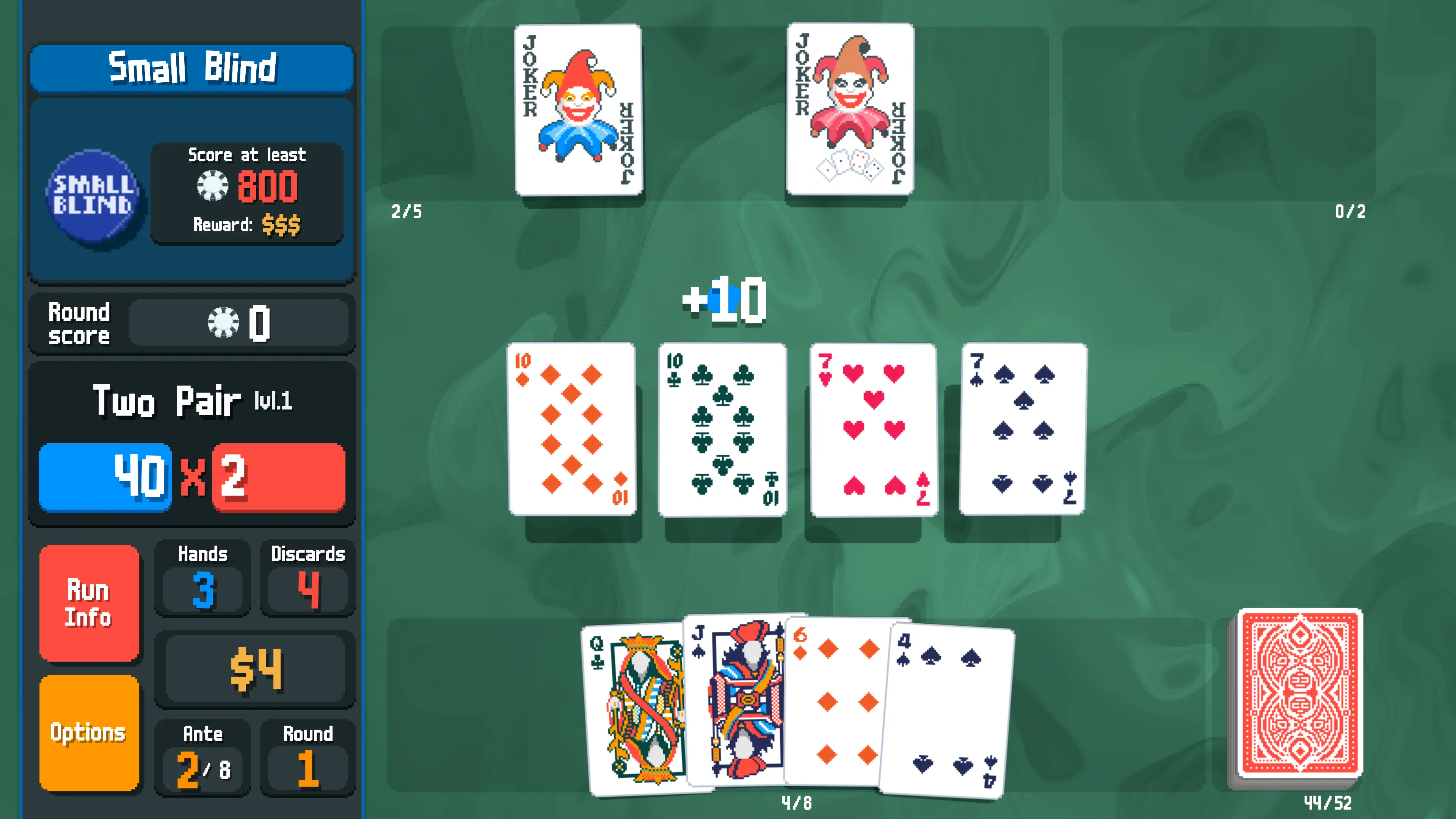
In Balatro, the blue and red boxes are the ingredients of a hand’s score. Round score is the total you have earned against the current target. They are not three names for the same number. Start by finding the left-hand panel, then follow the close-ups below while a played hand is being counted.

The pictures are real official gameplay examples, not menus we recreated. We checked the visible details on October 4, 2026; we did not capture these scenes in a current personal playthrough. The green-felt example and the later blue-table example are different hands. This guide explains the readout, not how to select or play cards.
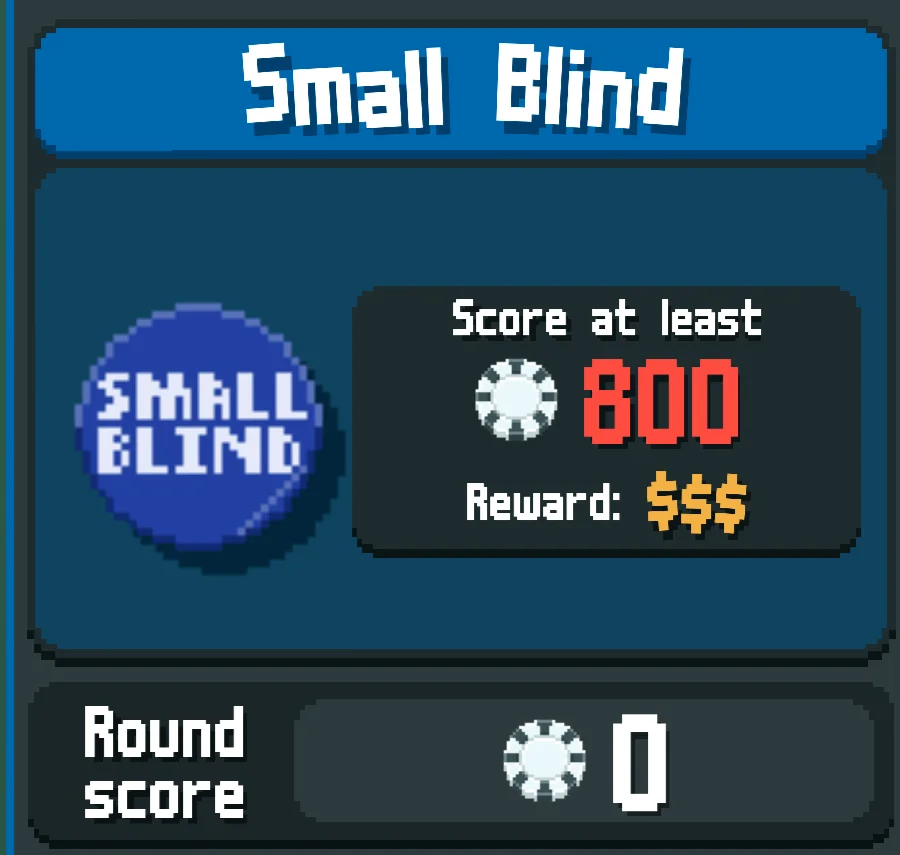

1. Find the target above Round score

Look at the top of the panel on the left. The blue heading says Small Blind in this example. A Blind is the round’s score challenge. Inside the darker box underneath, find Score at least and the large red 800. That is the target to reach, not the amount you have already earned. Your own target can be different.

The left panel shows Small Blind, Score at least 800 and Round score 0 directly below.
Compare Score at least with Round score underneath. The $$$ beside Reward is not the target.

Now look directly below the target for Round score. It reads 0 here because the pictured hand has not finished counting. After a hand finishes, its points are added to this round total. If one hand falls short, earlier and later hands in the same Blind can still add together; you do not always need to reach the target in a single play.

2. Read blue Chips and red Mult together

Move farther down the same left panel, beneath Round score. Find the hand name Two Pair, with lvl.1 beside it. Directly underneath are a blue 40, a multiplication sign and a red 2. Blue is Chips. Red is Mult, short for multiplier. The name above them identifies the poker hand being counted; lvl.1 is that hand type’s level, not the round number.

Two Pair lvl.1 appears above the blue 40 Chips box and red 2 Mult box, separated by a multiplication sign.
Blue is Chips; red is Mult. This 40 × 2 picture was taken during counting, not at the end.

The usual hand calculation multiplies the final Chips by the final Mult after the effects finish. As a simple maths example, 100 Chips × 10 Mult gives 1,000 points. Those numbers are an example, not a promise about the pictured hand. Do not add the blue and red numbers together. Special rules can change the calculation; the Plasma Deck, for example, balances the two values before the final multiplication.

3. Watch the played cards before trusting a total

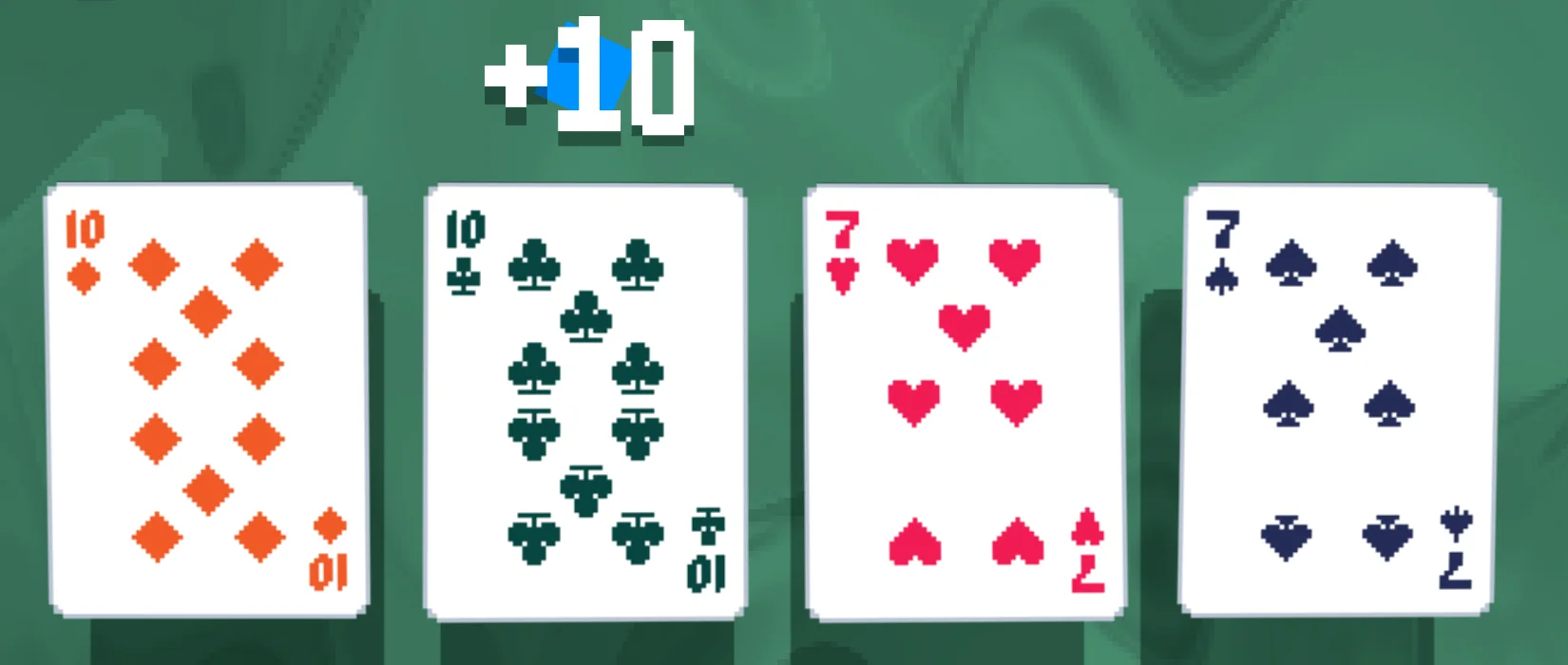
Look across the table to the separate row of cards being scored, above the cards still held along the bottom. In the green-felt example, the played row has two cards marked 10 and two marked 7. Matching the rank numbers identifies the two pairs even though their suit symbols and colours differ.

Two Tens and two Sevens form the played Two Pair row, with a blue +10 popup above one Ten.
The +10 above a played Ten is a counting effect. It is not the completed hand score.

The +10 popup and changing blue number show that counting is in progress. More cards or effects may still change Chips or Mult. Wait until that sequence finishes, then return to Round score beneath the Blind target. Use the updated round total to judge whether you have reached Score at least, rather than freezing on a number halfway through the animation.

4. Notice whether a bonus says + or X

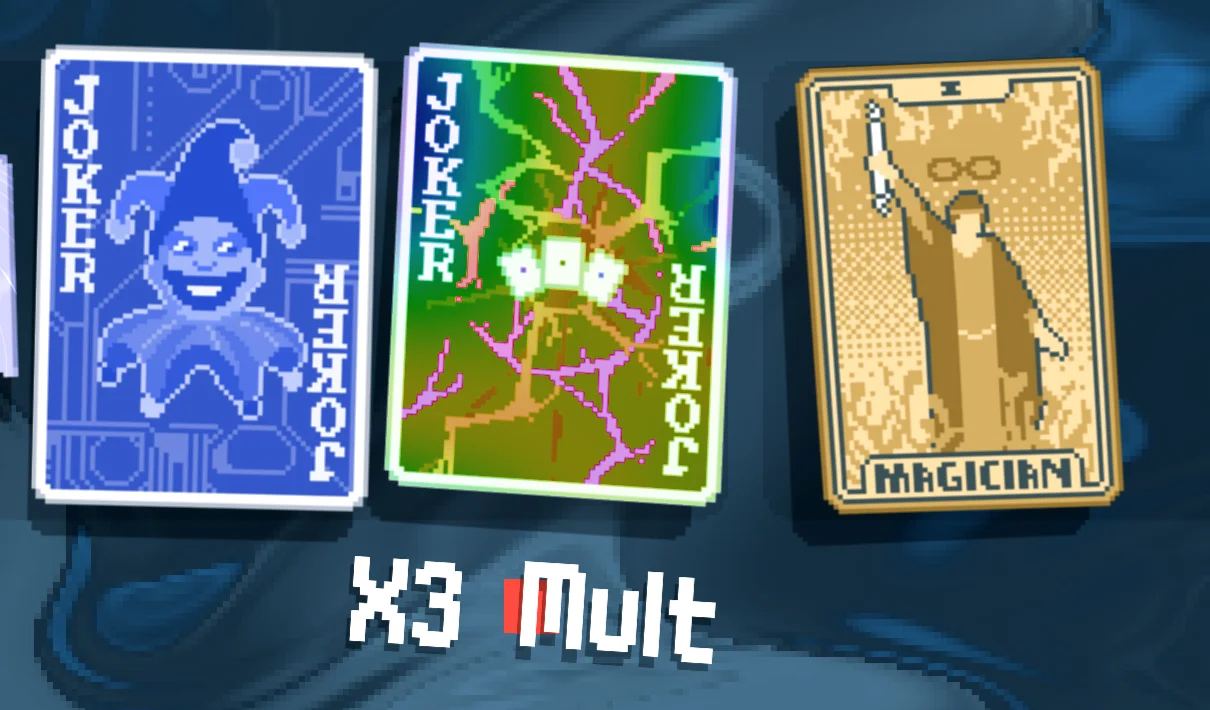
While effects are being counted, watch the short text that appears near the cards. A plus sign means an addition. X or × means multiplication. In this separate blue-table example, the popup X3 Mult appears beneath the Joker row near the top of the screen. Read both the sign and the word Mult; it is not a +3 bonus or a cash reward.

An X3 Mult popup appears below the top-row Joker cards in a different official Balatro scoring example.
X3 Mult means multiply the current Mult by three. This is a different hand from the Two Pair example.

For a plain maths comparison, starting at 10 Mult and adding +3 makes 13. Starting at 10 Mult and applying X3 makes 30. These effects are different, and later effects can change the number again. This close-up identifies the visible bonus; it does not tell you that every Joker gives it or that it will trigger on every hand.

5. Keep Hands, Discards and cash separate

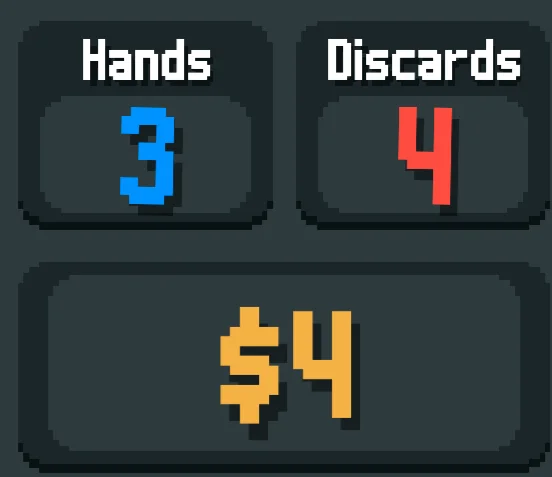
Below the Chips and Mult area on the left, find the two small boxes labelled Hands and Discards. Hands has a blue 3 here: three plays remain in this Blind. Discards has a red 4: four discard uses remain. A discard replaces cards instead of scoring a played hand. The red Discards count is not the red Mult value farther up the panel.

The lower-left panel shows Hands 3, Discards 4 and a separate yellow $4 cash readout.
Read the labels: Hands counts remaining plays, Discards counts replacements and $4 is cash.

The yellow number underneath has a dollar sign: $4. That is in-game money for purchases, not 4 Chips and not part of Round score. If your score is short, spending money and earning points are still separate actions. Judge the round by Round score versus Score at least, with Hands telling you how many plays are left.

Why does the shop show 0 × 0?

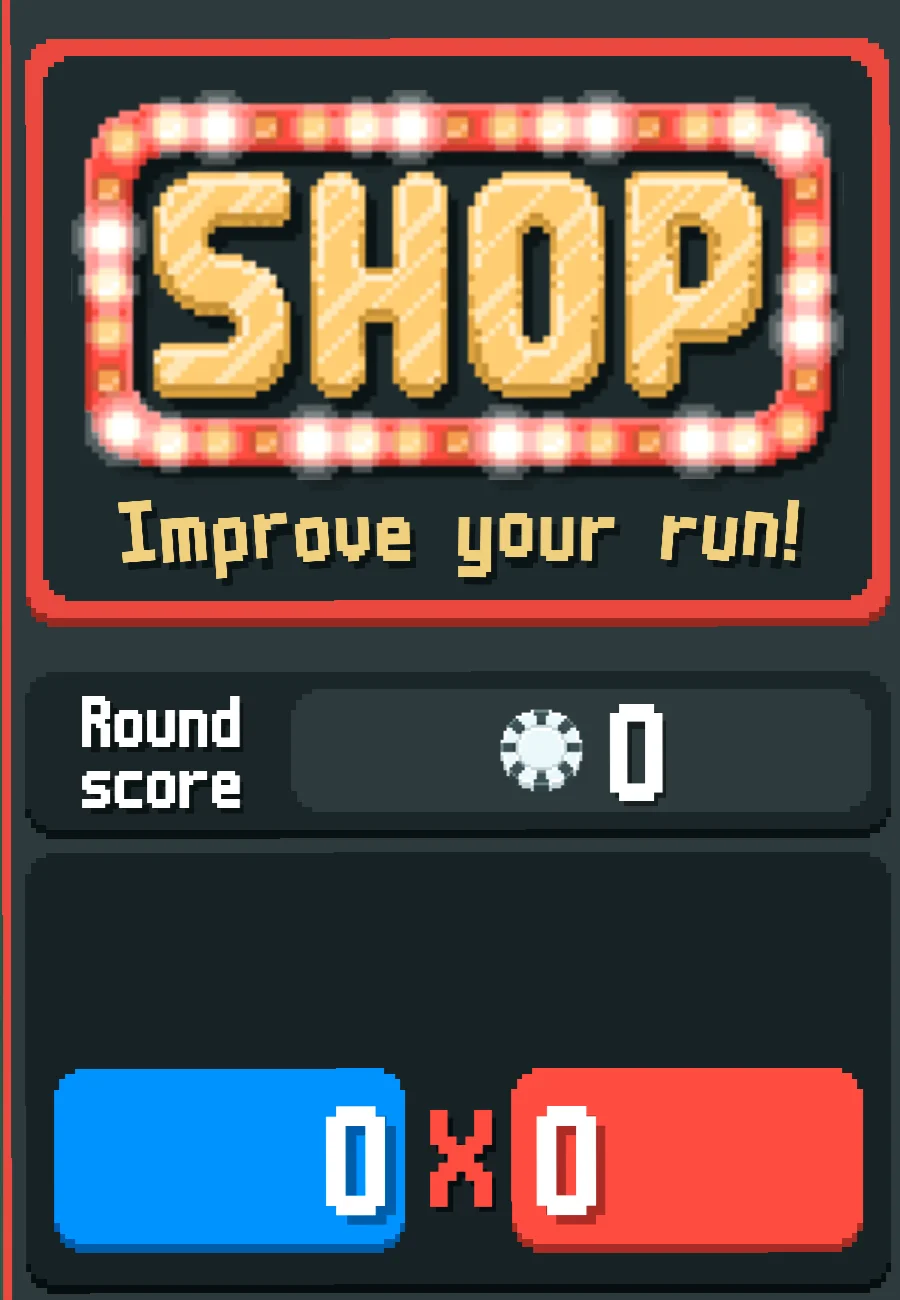
When the large SHOP sign replaces the Blind heading on the left, you are looking at the shop, not a hand being scored. In the official example below, Round score and the blue/red boxes all show zero. That idle display does not mean your cards have permanently lost their score.

A SHOP sign sits above Round score 0 and an idle blue 0 × red 0 readout.
The SHOP sign explains the zeros: this is not a scoring animation.

The useful check is simple: identify whether a Blind or SHOP is showing, find the target if you are in a Blind, and wait for counting to finish before comparing the round total. For the game’s platform list and a spoiler-free overview of how runs and shops fit together, open the Balatro game page.

Get Pixel Twelve's biggest stories first.

Add as a preferred source on Google